

Open the editor
- Start creating a voice agent and choose the Blank template. This template exposes the Engine choice.
- Select Conversational flow and complete creation.
- Open the agent’s Conversational Flow tab and select Start Editing to edit the draft.
- If the page shows No Conversation Flow, select Create Conversation Flow. Revve adds an Initial Greeting node for you to customize.
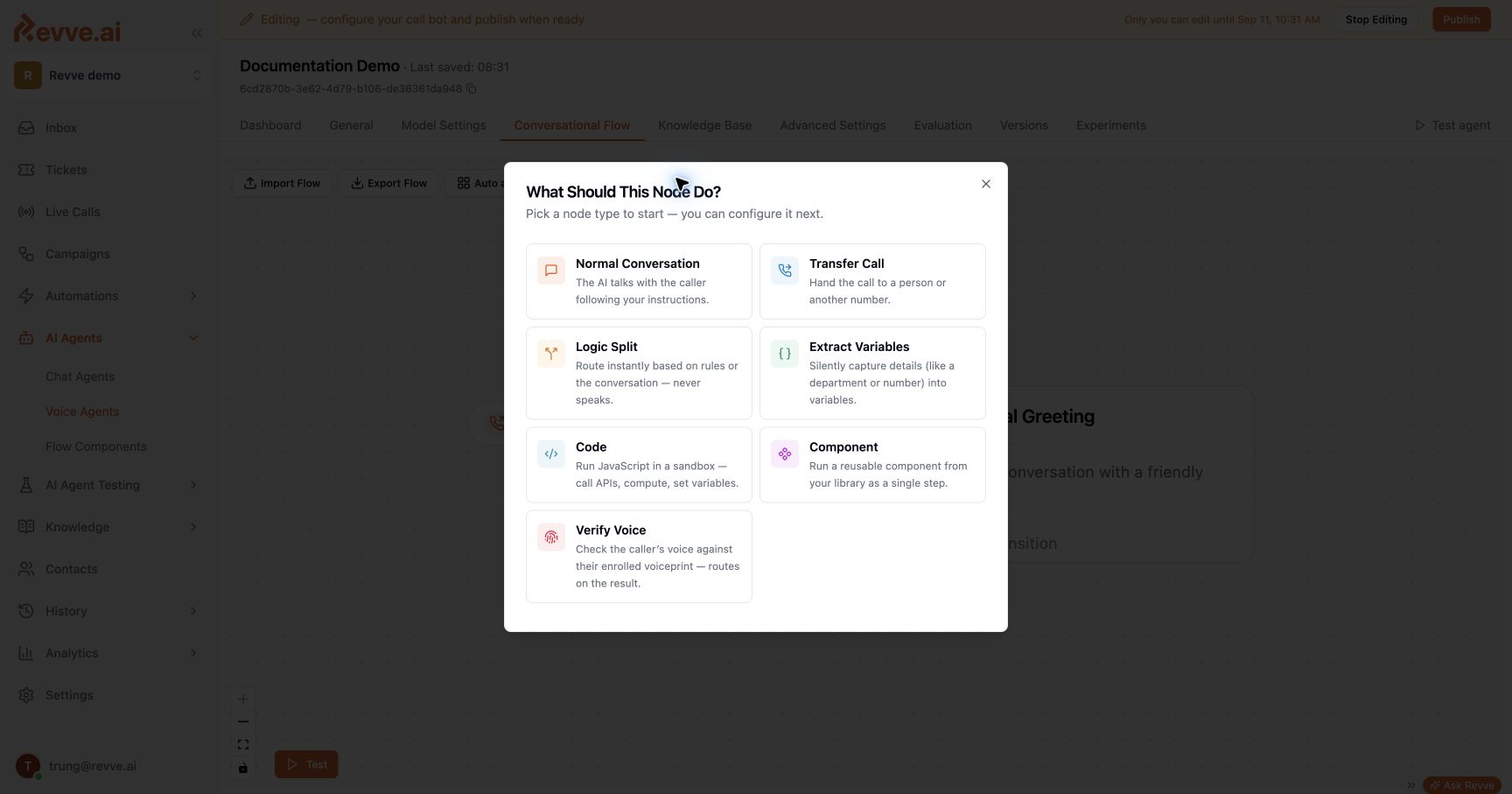
Node types
Logic Split, Extract Variables, Code, and Verify Voice have an Else path for fallback handling. Connect this path as part of the flow. Components expose their configured exits, which connect back into the parent flow. There is no separate End node; every node has a built-in ability to end the call.
Scheduling and contact-collection capabilities are configured through the conversation and tool controls; they are not separate voice node types in the Add Node picker.
Control what the agent says
Conversation nodes offer two instruction modes:- AI phrases it gives the model instructions for the stage.
- Exact words sends the configured wording directly to speech synthesis. Use it for approved disclosures, confirmations, and lines that must be read consistently. Supported variable templates can insert customer or service data.
Route on data and conversation
Transitions connect a condition to a destination. Deterministic comparisons, such as{{retry_count}} >= 3, are evaluated before AI-judged conversational conditions. Use comparisons for counters, thresholds, and verified API results. Use natural-language conditions for conversational intent.
A useful service flow is:
- Ask for the information needed to identify the request.
- Extract and validate the fields.
- Call the verification service and branch on its returned status.
- Retrieve the permitted information or explain the proposed action.
- Ask for confirmation before calling a tool that changes data.
- Report the returned result, or follow a defined failure path.
Tools and data
Attach custom API tools to call external systems. Configure the tool selection for the relevant nodes and review Global Tool settings, which make a tool available throughout the flow. Do not assume that leaving a node’s selection empty is an authorization boundary; enforce permissions in the receiving service. Built-in flow abilities, knowledge retrieval, and configured global tools have their own availability rules. Test which tools the agent can call at each sensitive stage before publishing. Use captured variables for business fields such as customer references, payment dates, case statuses, and retry counters. Keep live amounts and transaction states tied to the source API response.Global nodes and reusable components
A Global Node can be reached when its configured condition occurs elsewhere in the conversation. Use this for requests to speak with a person, opt-outs, or urgent situations. Configure its outgoing transitions and return behavior deliberately so the caller resumes at the appropriate stage. A Component packages a reusable sequence with named exits. Use components for common steps such as identity checks or standard disclosures, then connect each exit to the appropriate destination in the parent flow.Transfer a call
A Transfer Call node supports Revve User, SIP Address, and Phone Number destinations. Configure the destination, transfer message, and optional summary prompt. Bridge Transfer brings the transferee into the call while the AI stays silent and logging continues. Cold Transfer hands the call off with SIP REFER; Revve does not continue logging the subsequent customer-agent conversation. Choose the mode that fits your telephony system and recording requirements. See Call Transfer. To move on when a transfer cannot connect:- Select the Transfer Call node in your draft.
- Set Connection timeout (seconds) to a whole number from 1 to 180. This setting applies to in-app transfers and phone/SIP bridges.
- Connect Transfer Failed to a node that explains the failed transfer and offers the caller a next step.
- Test answered, unanswered, and fallback attempts before publishing the agent version.
Protect verification steps
Use Voice Verification to route on enrolled voiceprint results. Use Sensitive Data in Voice Flows to configure transcript masking, captured-value masking, and protected recording intervals around a sensitive question.Test and publish
Keep general rules in the agent’s Instructions and stage-specific behavior in the individual nodes. Test the start path, interruptions, retries, missing data, external-service errors, and every fallback before publishing. Voice Agent Evaluation can check the conversation outcome and required tool calls.What’s Next
- Custom API Tools — connect a stage to an external service.
- Call Transfer — configure the handoff to a human.