

Single Prompt
Single Prompt is the default and most common engine type. You provide one set of instructions (called “Objectives”) that the agent follows for every conversation.How It Works
- You write instructions telling the agent its role, goals, and constraints.
- When a visitor sends a message, the agent combines:
- Your instructions
- The conversation history
- Relevant content from your knowledge base
- Any connected tools
- The LLM generates a response based on all of this context.
What You Configure
On the Basic tab:- Objectives — The core instructions that guide the agent’s behavior.
- Role — A description of the agent’s persona.
- AI Model — Which LLM to use.
- Language & Tone — Response language and communication style.
- Human Escalation — When to hand off to a human.
- Contact Collection — Lead capture form configuration.
- Schedule Meeting — Calendar booking integration.
- Inactivity Follow-up — Auto-reply when the visitor goes silent.
- Tools — External API calls and CRM integrations.
Best For
- General-purpose support and FAQ agents.
- Lead qualification with flexible conversation paths.
- Agents that need to handle a wide variety of topics.
- Quick setup when you want to get started fast.
Example Instructions
Conversational Flow
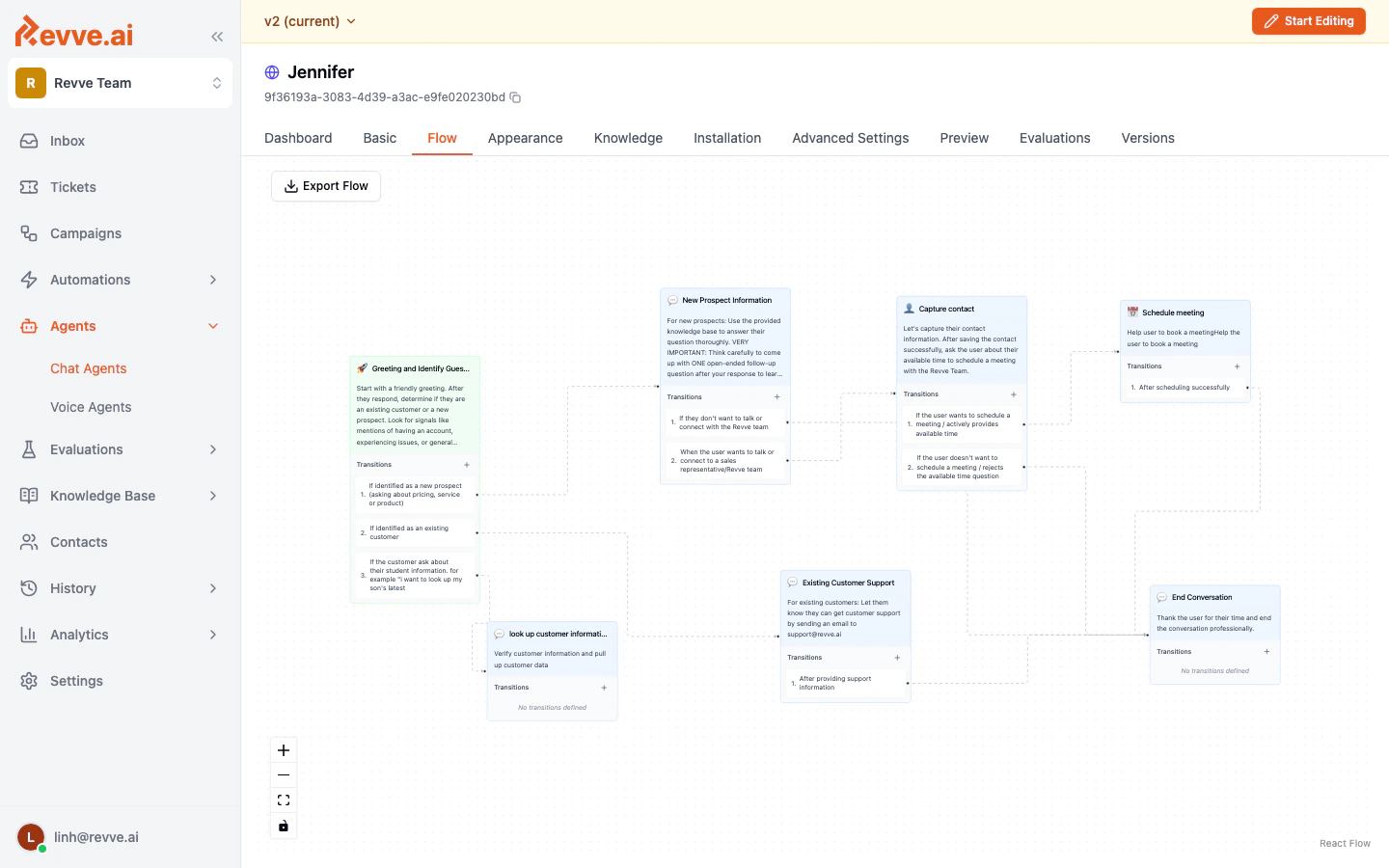
Conversational Flow uses a visual node-based editor where you design a structured conversation tree. Each node represents a specific stage in the conversation with its own instructions, transitions, and capabilities.How It Works
- You create nodes — each one is a conversation stage (e.g., “Greeting”, “Qualification”, “Schedule Meeting”).
- You define edges (transitions) between nodes with conditions for when to move from one stage to the next.
- Each node has its own instructions that apply only when the conversation is in that stage.
- The agent follows the flow, transitioning between nodes based on the conversation.
What You Configure
On the Flow tab:- Nodes — Create conversation stages with individual instructions.
- Edges — Define transitions with conditions (e.g., “when the user provides their email, move to the Qualification node”).
- Global Prompt — Instructions that apply across all nodes.
- Start Node — Which node begins the conversation.
- Contact collection
- Meeting scheduling
- Human escalation
- Testimonial display
- Custom tools
Node Types
Best For
- Structured qualification funnels (e.g., “What’s your budget?” > “What’s your timeline?” > “Book a demo”).
- Conversations that must follow a strict sequence.
- Different conversation branches that require completely different behavior.
- Complex multi-step workflows where each stage has distinct rules.
Comparison
Choosing the Right Type
Start with Single Prompt if:- You’re setting up your first agent.
- Your conversations don’t follow a strict path.
- You want to get started quickly and iterate.
- You have a well-defined conversation funnel.
- Different stages require entirely different agent behavior.
- You need granular control over when specific actions (booking, lead capture) happen.
You choose the engine type at creation time. To switch from Single Prompt to Conversational Flow (or vice versa), you’ll need to create a new agent.
What’s Next
- Publishing & Versioning — How to publish your agent and manage versions.