

What Is a Global Node?
A global node is a regular node with one extra setting enabled: the Global Node toggle. When turned on, the AI will consider transitioning to this node from any other node in the flow, not just nodes that have a direct transition arrow pointing to it. Think of it as a universal interrupt. No matter where the visitor is in the conversation, if their message matches the global node’s condition, the AI can jump to it.Typical Uses for Global Nodes
How to Make a Node Global
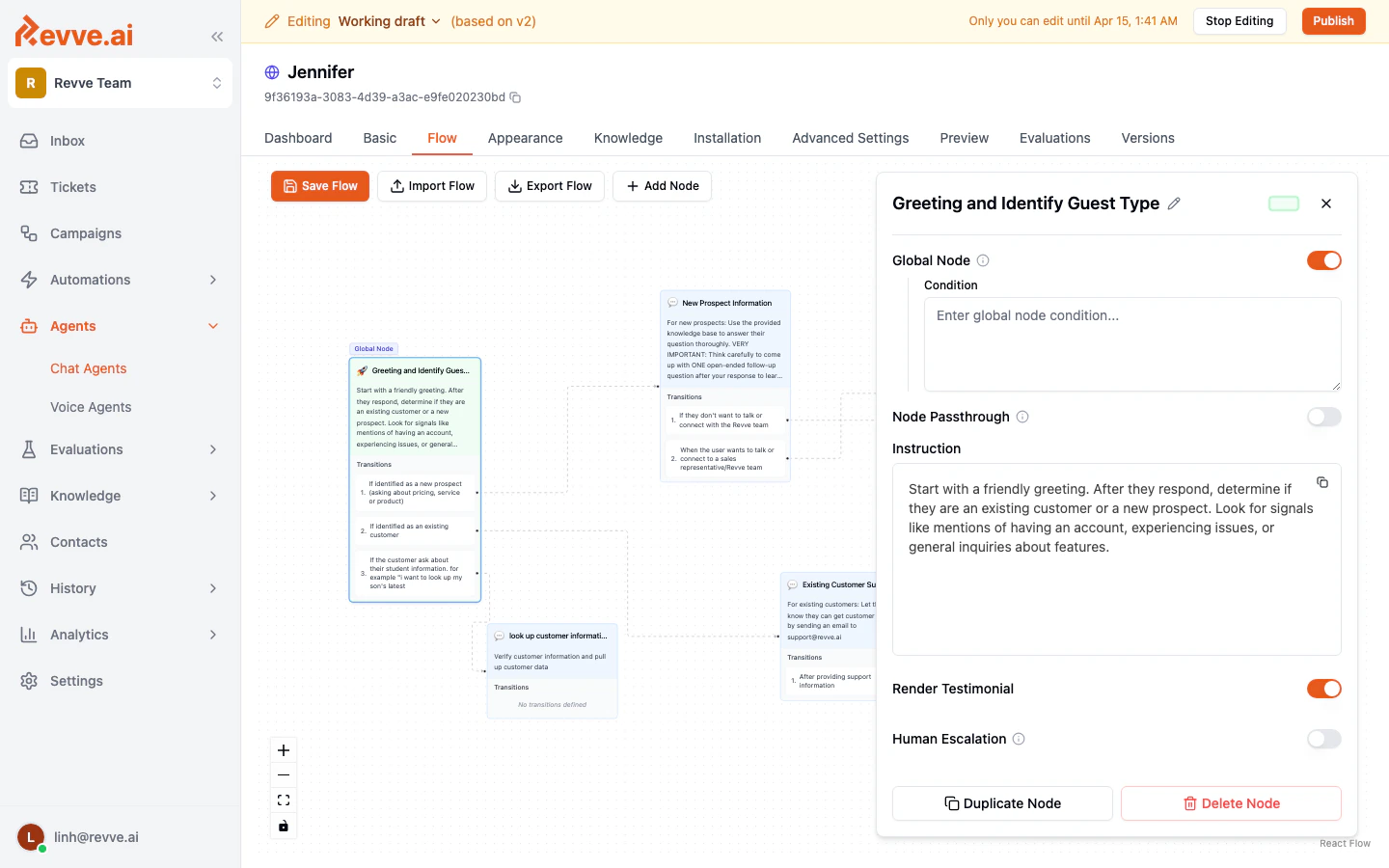
- Click on the node in the canvas to open its configuration panel on the right.
- Find the Global Node toggle near the top of the panel and switch it on.
- A Condition text field appears below the toggle. Enter a plain-language rule that describes when the AI should jump to this node.
Tips for Global Node Conditions
- Be specific enough that the condition does not fire unintentionally. For example, “If the visitor asks to speak with a human agent” is better than “If the visitor seems frustrated.”
- Keep the number of global nodes small. Each global node’s condition is evaluated at every turn, so having too many can make the AI’s routing less predictable.
- You can still add regular transitions to and from a global node. The global behavior is additive — it does not replace direct transitions.
What Is the Global Prompt?
The global prompt is a set of AI instructions that apply across every node in the flow. It acts as a baseline personality, tone, and behavioral guide that the agent follows regardless of which conversation stage is active. For example, a global prompt might say:“You are Jennifer, a friendly and professional assistant for Revve AI. Always be concise, helpful, and polite. Never share internal company information. If you are unsure about something, let the visitor know and offer to connect them with the team.”
Where the Global Prompt Fits
When the AI processes a message, it combines:- The global prompt — universal instructions for tone, personality, and rules.
- The current node’s instruction — stage-specific directions for what to say or do.
- Transition conditions — rules for deciding whether to move to another node.
How to Edit the Global Prompt
The global prompt is configured at the flow level, not on individual nodes. It is typically set during the initial flow setup or through the flow’s Advanced Settings. Contact your account administrator if you need to update the global prompt for an existing flow.The Start Node
Every flow has a designated start node — the node where every new conversation begins. The start node is visually distinguished on the canvas (it typically has a different background color or a “Start” indicator).Key Facts About the Start Node
Best Practice for the Start Node
Design the start node to greet the visitor and quickly determine their intent. A common pattern:- The start node greets the visitor and asks how it can help.
- Based on the visitor’s response, transitions route the conversation to specialized nodes (for example, “New Prospect,” “Existing Customer,” or “Technical Support”).
Best Practices
- Use the global prompt for universal rules such as tone, language, things the agent should never say, and how to handle off-topic questions.
- Reserve global nodes for truly cross-cutting needs. If a topic only comes up in one part of the flow, use a regular transition instead.
- Test global node conditions carefully. Because global nodes can interrupt any stage, a poorly written condition can cause unexpected jumps in the conversation.
- Review your start node regularly. The start node sets the first impression for every visitor. Make sure its greeting and routing logic stay current.
Next Steps
- Flow Node Features — Learn about per-node settings like contact collection, testimonials, human escalation, and tool assignment.
- Creating and Connecting Nodes — Review how to add nodes and define transitions.