

Draft and published state
A campaign always has at most one working draft and, once published at least once, exactly one active published version.- Editing a campaign creates a draft based on the campaign’s current active version. Only one person can hold the edit lock at a time, for up to 2 hours — the same editing-lock mechanic Chat Agents use (Publishing & Versioning documents the lock banner and timer UI in detail).
- The draft tracks which fields you’ve changed and which published version it was based on. Changes you save go to the draft only — the live campaign keeps running on the last published version until you publish.
- A draft’s snapshot covers the campaign’s versioned configuration: name, description, instructions, state flow and state descriptions, flow type, LLM provider/model and decision-model settings, multi-channel setting, exit conditions, the “move to campaign” target, prehook config, and a full snapshot of agent and step configuration.
Publishing
Publishing does five things, in order:- Checks the draft is still current. The draft records which version it was based on. If someone else published a newer version while you were editing, publishing is blocked with an error rather than silently overwriting their changes (see below).
- Writes a new immutable version. A new row is added to the campaign’s version history with an incremented version number, who published it, an optional publish note, a field-level diff of what changed, and a full snapshot of the configuration and steps at that point in time.
- Makes it active. The campaign’s active version pointer moves to the new version.
- Syncs the live runtime. The campaign’s live agent and step configuration is refreshed from the new version’s snapshot, so in-progress campaign logic reads the new config going forward.
- Asks about in-flight enrollments, if any exist. See below — this step only appears when contacts are currently enrolled.
If your draft falls behind
If someone else published a new version while you were still editing, your draft’s base no longer matches the campaign’s active version, and step 1 above blocks the publish: you get an error (“A newer version was published while you were editing”) instead of a new version. There’s no automatic merge or rebase — the only way forward is Discard Draft, then re-edit from the campaign’s current active version. Whatever you’d changed in the stale draft isn’t preserved through the discard, so for a large in-progress edit it’s worth copying your changes out before discarding.In-flight enrollments
This is the one place campaign versioning differs from Chat Agents and Voice Agents: campaigns run for days or weeks, so contacts can be mid-journey when you publish a new version. When you publish (or when a reviewer approves a submitted-for-review publish) and the campaign has contacts currently enrolled, a confirmation dialog asks whether to move those contacts onto the new version or leave them on the version they enrolled with. The default is to leave them where they are — moving existing enrollments is opt-in. This is a one-time re-point of the enrollment’s version reference: only that contact’s future decisions read the new configuration, and any action already scheduled for them keeps running under the version they were on when it was scheduled. The dialog copy, the “keep” vs. “upgrade” choice, and how it interacts with the approval workflow are documented in Publish Approval Workflow (see “Campaign-specific nuance: in-flight enrollments”) and Creating a Campaign (see “Step 4: Publish”). This page only needs you to know the fork exists: publishing a campaign version is not automatically retroactive to contacts already running.There’s a separate, unrelated action called Rollback to Active on individual enrollments. It re-activates one contact who previously exited a campaign back to active status. It does not touch campaign versions, doesn’t change
active_version_id, and isn’t a way to undo a publish — see the next section.Version history
The Versions tab shows your current draft (if any) and every published version.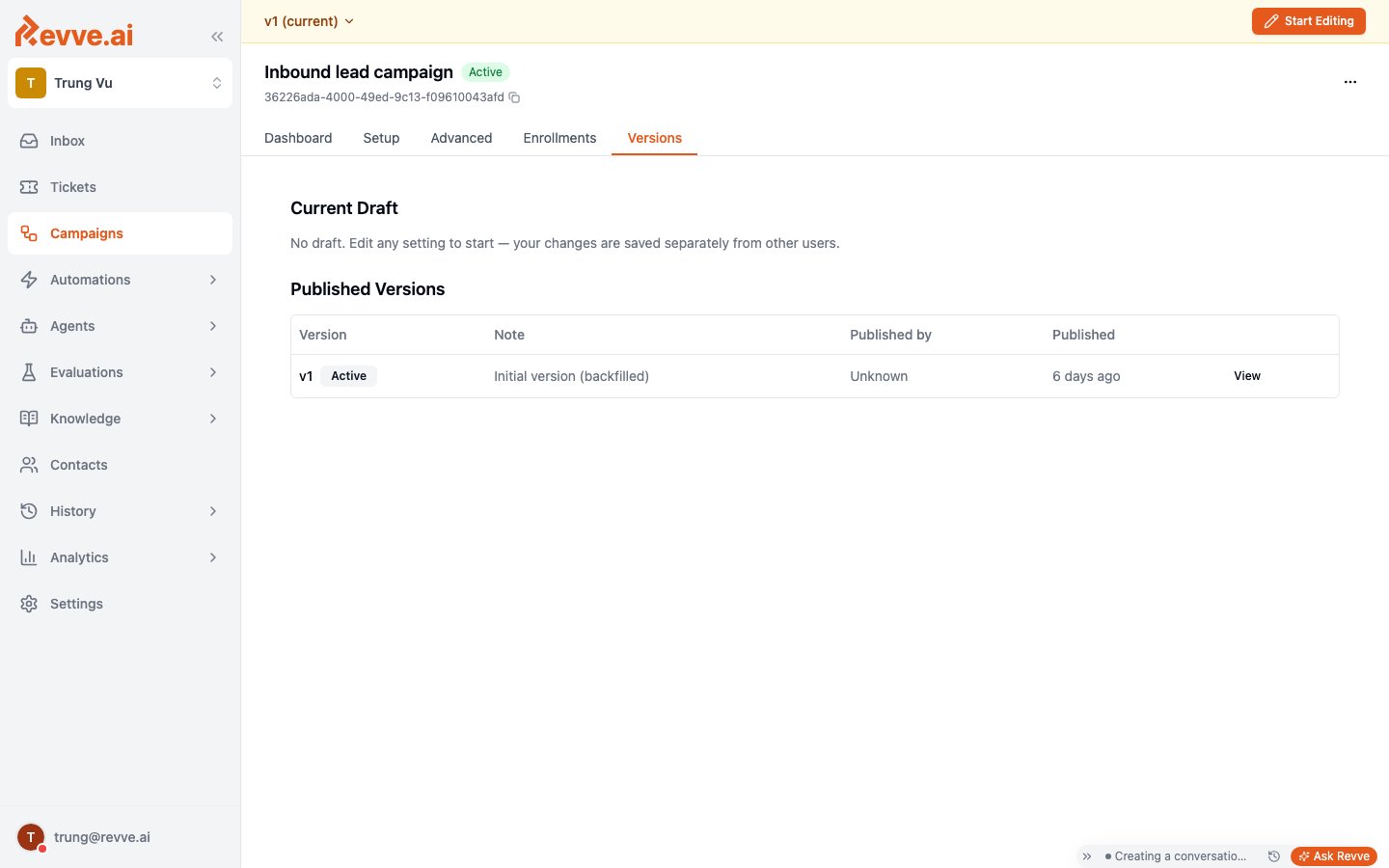
Published Versions is a table of every version ever published, oldest to newest:
The Active badge isn’t returned by the API as a flag on each version — it’s computed in the dashboard by comparing each version’s ID to the campaign’s current active version.
View is read-only, and that’s the only recovery lever
Clicking View on a past version opens it in read-only mode so you can inspect exactly what was configured at that point — useful for an audit trail or for diagnosing when a behavior change was introduced. There is no restore, rollback, or revert action anywhere in campaign versioning. If you need to go back to an earlier configuration, you re-create it as a new draft and publish it as a new version; the version you’re reverting to stays in history unchanged, and the “reverted” state becomes a new version number, not the old one becoming active again.What’s Next
- Publish Approval Workflow — the request/approve/decline flow and the full in-flight-enrollment dialog behavior.
- Publishing & Versioning — the same draft/lock/version pattern documented in depth for Chat Agents.
- Voice Agent Versioning — the same pattern for Voice Agents, including the voice-specific “View changes” diff.