> ## Documentation Index
> Fetch the complete documentation index at: https://www.revve.ai/docs/llms.txt
> Use this file to discover all available pages before exploring further.
# Voice Agent Publishing & Versioning
> How drafts, publishing, and version history work for voice agents, and how they differ from chat agents.
Voice agents use the same **draft-based editing workflow** as chat agents: a live published version, a private working draft, a 2-hour editing lock, and an immutable version history on every publish. If you haven't read [Publishing & Versioning](/docs/getting-started/publishing-and-versioning), start there — it covers the full mechanics of drafts, the editing lock, and the Versions table in depth. This page assumes that pattern and documents only what's different for voice agents.
This page documents the **Revve provider** path (tabs Dashboard / General / Model Settings / Knowledge Base / Advanced Settings / Evaluation / Preview / Versions). Legacy Retell-provider agents show a different set of tabs and aren't covered here.
## What's identical to chat agents
Voice agents are not a `type` on the same underlying agent record — they're built on their own dedicated tables and their own versioning service, which independently mirrors the chat-agent logic function-for-function: creating a draft, acquiring and releasing the editing lock, and publishing with an optimistic-concurrency check against the version the draft was based on. The result is that the workflow feels identical:
* **Start Editing** creates a draft based on the current published version and acquires an editing lock.
* The editing lock lasts **2 hours**, shown as a countdown in the top bar, and can only be held by one person at a time.
* **Stop Editing** releases the lock and preserves the draft for later.
* **Publish** creates a new, immutable version and makes it the active version.
* If someone else publishes while you're editing, you'll hit the same base-version-vs-active-version conflict check described in [Publishing & Versioning](/docs/getting-started/publishing-and-versioning).
The banner, lock timer, and **Start Editing**/**Stop Editing** buttons are the literal same shared UI component chat agents use — not a lookalike — so anything you already know about that banner from the chat-agent page applies here unchanged.
## The Versions tab
Every Revve-provider voice agent has a **Versions** tab in its left navigation, alongside General, Model Settings, Conversational Flow, Knowledge Base, Advanced Settings, Evaluation, and Preview.
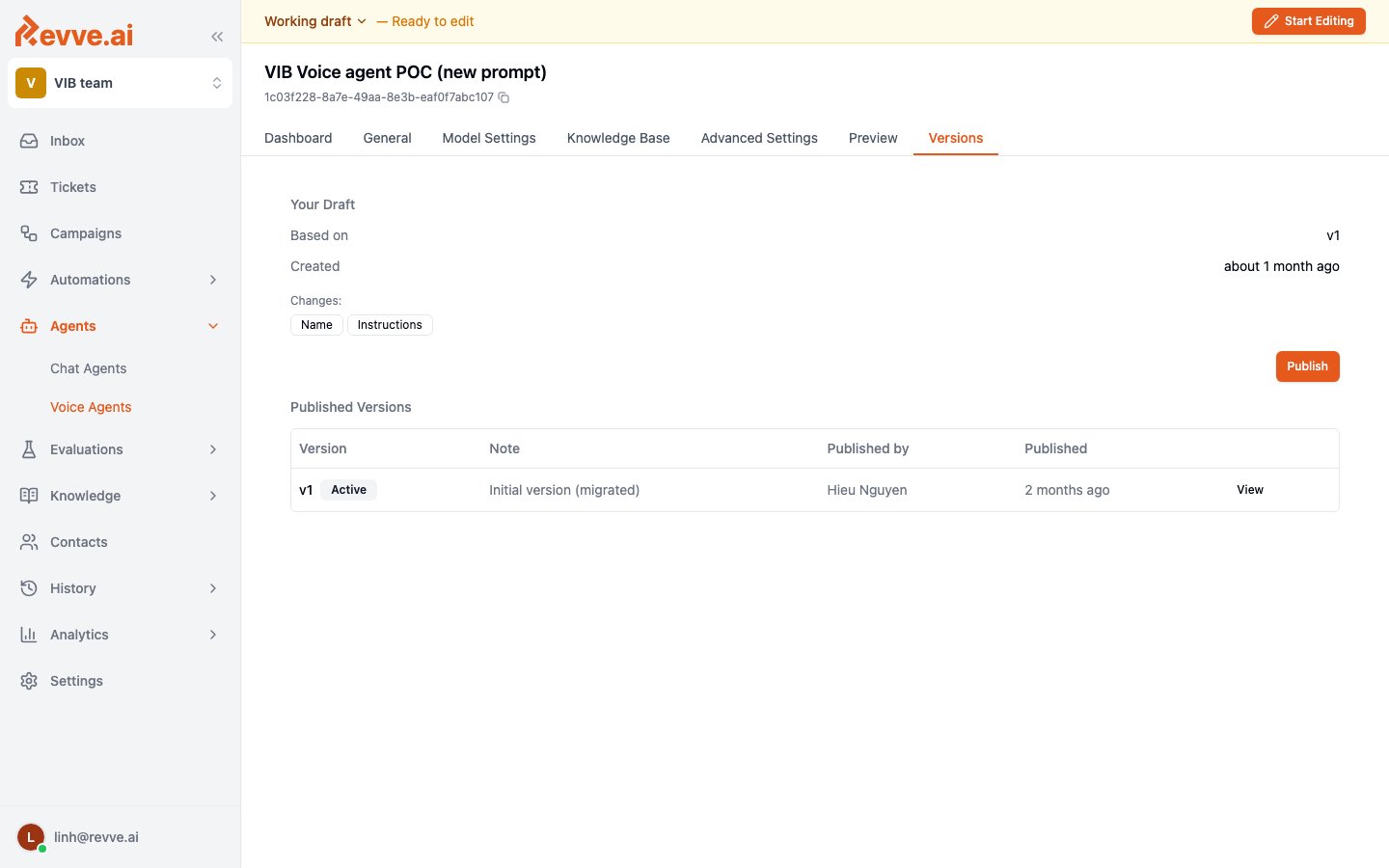 **Your Draft** — same shape as chat agents:
* **Based on** — which published version the draft was branched from.
* **Created** — when the draft was created.
* A **Publish** button, or a **Submit for Review** button if you don't hold the Publish Agents permission. See [Roles & Permissions](/docs/governance-access/roles-and-permissions) for what that permission controls and [Publish Approval Workflow](/docs/governance-access/publish-approval-workflow) for how request/approve/decline works — voice agents are one of the three resource types that workflow covers.
**Published Versions** — the same table columns as chat agents:
| Column | Description |
| ---------------- | ----------------------------------------------------------------------- |
| **Version** | Version number, with an **Active** badge on the currently live version. |
| **Note** | The publish note added at publish time. |
| **Published by** | The team member who published the version. |
| **Published** | When the version was published. |
| **View** | Read-only inspection of that version's configuration. |
| **View changes** | Voice-only. See below. |
## What voice agents version
A published voice agent version snapshots more than conversational content. The tracked fields include the provider selection, the full provider config (and hybrid-provider config), extra config, the STT, TTS, LLM, and analysis-LLM provider selections, phone verification config, and the outbound caller ID number.
In practice, this means a voice agent's version history is a record of what phone number and which speech/LLM providers were live at a given point in time — not just prompt or flow changes. For a compliance review, a version entry can answer "which STT/TTS/LLM provider and which outbound number was this agent using on a given date," in addition to what the conversational flow looked like.
## View changes: the one thing voice agents have that chat agents don't
The Versions table for voice agents adds a **View changes** button next to **View** on each row — chat agents and campaigns only get **View**. Clicking **View changes** opens a dialog showing a field-level diff against the prior version, including knowledge base references resolved to their names rather than raw IDs.
**View changes** is read-only. It shows you what changed between two versions — it does not apply, restore, or revert anything. There is no button anywhere in the product that rolls a published voice agent configuration back to a prior version.
If you need to undo a change, the only path is to start editing, manually re-create the prior configuration in your draft (using **View** or **View changes** on the old version as a reference), and publish. There is no one-click restore.
## What's Next
The full draft, editing-lock, and version-history mechanics shared with chat agents.
How request, approve, and decline work when you don't hold the Publish Agents permission.
See also [Campaign Versioning](/docs/campaigns/campaign-versioning) for how the same pattern applies to campaigns, including the campaign-specific in-flight-enrollments behavior.
**Your Draft** — same shape as chat agents:
* **Based on** — which published version the draft was branched from.
* **Created** — when the draft was created.
* A **Publish** button, or a **Submit for Review** button if you don't hold the Publish Agents permission. See [Roles & Permissions](/docs/governance-access/roles-and-permissions) for what that permission controls and [Publish Approval Workflow](/docs/governance-access/publish-approval-workflow) for how request/approve/decline works — voice agents are one of the three resource types that workflow covers.
**Published Versions** — the same table columns as chat agents:
| Column | Description |
| ---------------- | ----------------------------------------------------------------------- |
| **Version** | Version number, with an **Active** badge on the currently live version. |
| **Note** | The publish note added at publish time. |
| **Published by** | The team member who published the version. |
| **Published** | When the version was published. |
| **View** | Read-only inspection of that version's configuration. |
| **View changes** | Voice-only. See below. |
## What voice agents version
A published voice agent version snapshots more than conversational content. The tracked fields include the provider selection, the full provider config (and hybrid-provider config), extra config, the STT, TTS, LLM, and analysis-LLM provider selections, phone verification config, and the outbound caller ID number.
In practice, this means a voice agent's version history is a record of what phone number and which speech/LLM providers were live at a given point in time — not just prompt or flow changes. For a compliance review, a version entry can answer "which STT/TTS/LLM provider and which outbound number was this agent using on a given date," in addition to what the conversational flow looked like.
## View changes: the one thing voice agents have that chat agents don't
The Versions table for voice agents adds a **View changes** button next to **View** on each row — chat agents and campaigns only get **View**. Clicking **View changes** opens a dialog showing a field-level diff against the prior version, including knowledge base references resolved to their names rather than raw IDs.
**View changes** is read-only. It shows you what changed between two versions — it does not apply, restore, or revert anything. There is no button anywhere in the product that rolls a published voice agent configuration back to a prior version.
If you need to undo a change, the only path is to start editing, manually re-create the prior configuration in your draft (using **View** or **View changes** on the old version as a reference), and publish. There is no one-click restore.
## What's Next
The full draft, editing-lock, and version-history mechanics shared with chat agents.
How request, approve, and decline work when you don't hold the Publish Agents permission.
See also [Campaign Versioning](/docs/campaigns/campaign-versioning) for how the same pattern applies to campaigns, including the campaign-specific in-flight-enrollments behavior.