> ## Documentation Index
> Fetch the complete documentation index at: https://www.revve.ai/docs/llms.txt
> Use this file to discover all available pages before exploring further.
# Voice Agent Settings
> Every Voice Agent setting explained — what it does, its default, and when you should (and shouldn't) change it.
This page covers the settings in the **General**, **Model Settings**, and **Advanced Settings** tabs. The guiding principle: **the defaults are tuned for natural conversation — change a setting only when you observe the specific problem it solves.** Each section below tells you what that problem looks like.
The **Evaluation** tab is a separate, policy-driven grading system for completed calls — it's covered on its own page: [Voice Agent Evaluation](/docs/voice-agents/voice-agent-evaluation).
## General
| Setting | What it does | Guidance |
| -------------------------- | ---------------------------------------------------------------------------------------------------- | ------------------------------------------------------------------------------------------------- |
| **Name** / **Description** | Internal identification — callers never see these. | Name by use case and audience ("Loan reminder — VN retail"), not just "Test 2". |
| **Region** | Where the call infrastructure runs: US or South East Asia. | Pick the region closest to your *callers*, not your office — it directly affects audio latency. |
| **System Prompt** | The instructions driving the whole call (Single Prompt engine). Supports `{{contact}}` placeholders. | The single highest-leverage setting. Specifics beat length; include what the agent must never do. |
## Model Settings
### Speech Recognition
Configures how the agent understands spoken input.
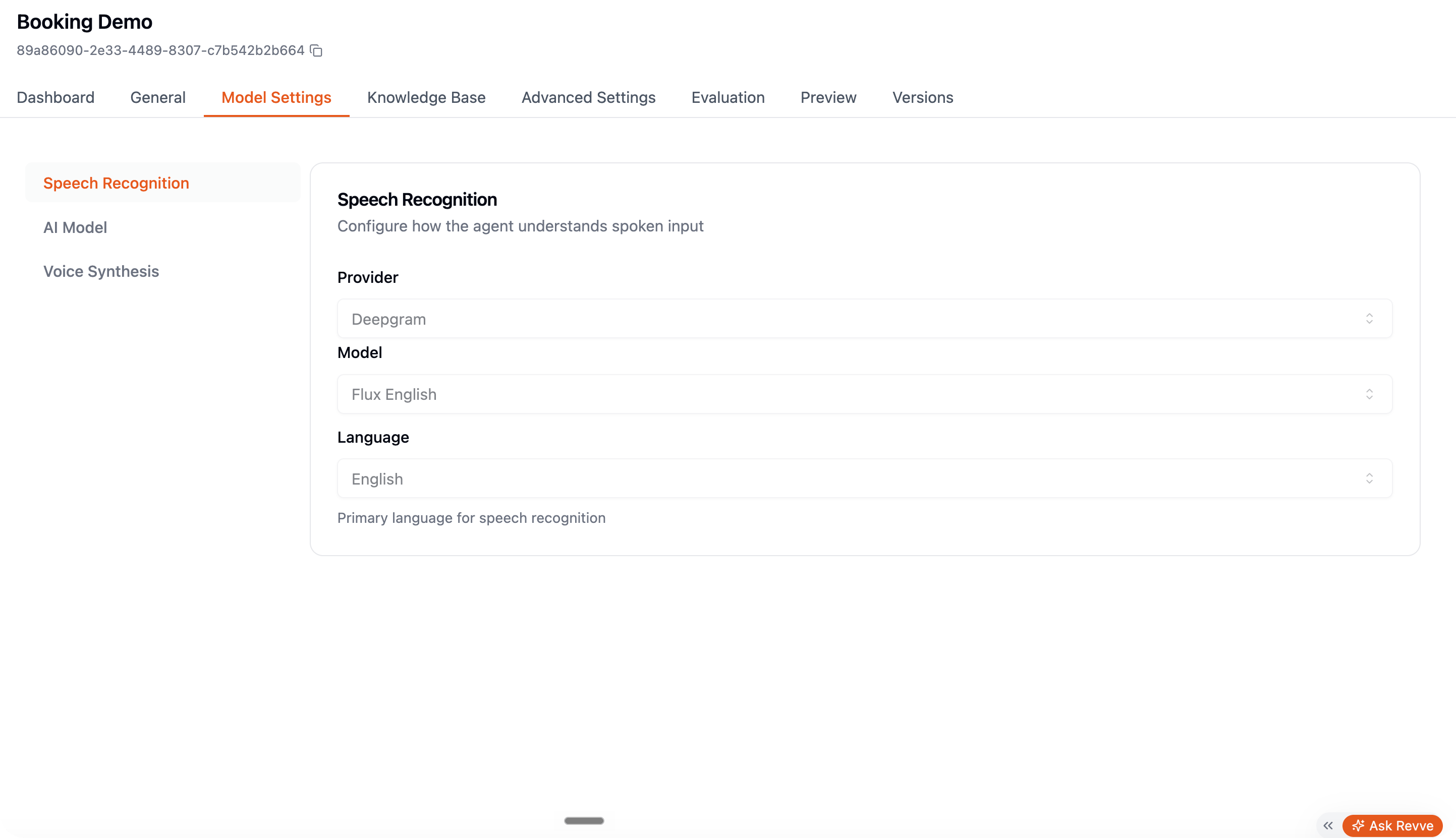 | Setting | Default | When to change |
| -------------------- | ------------------- | ------------------------------------------------------------------------------------------------------------------------------------- |
| **Provider / Model** | Revve's default STT | Rarely. Change only if a specific language or accent performs poorly and Revve support suggests an alternative. |
| **Language** | — | Always set this to your callers' language. Wrong language = garbage transcription = nonsense answers. |
| **Key Terms** | Empty | Add comma-separated brand names, product names, and jargon the transcriber keeps mishearing (check Preview transcripts to find them). |
### AI Model
| Setting | Default | When to change |
| -------------------- | ------------------- | ------------------------------------------------------------------------------------------------------------------------------------- |
| **Provider / Model** | Revve's default STT | Rarely. Change only if a specific language or accent performs poorly and Revve support suggests an alternative. |
| **Language** | — | Always set this to your callers' language. Wrong language = garbage transcription = nonsense answers. |
| **Key Terms** | Empty | Add comma-separated brand names, product names, and jargon the transcriber keeps mishearing (check Preview transcripts to find them). |
### AI Model
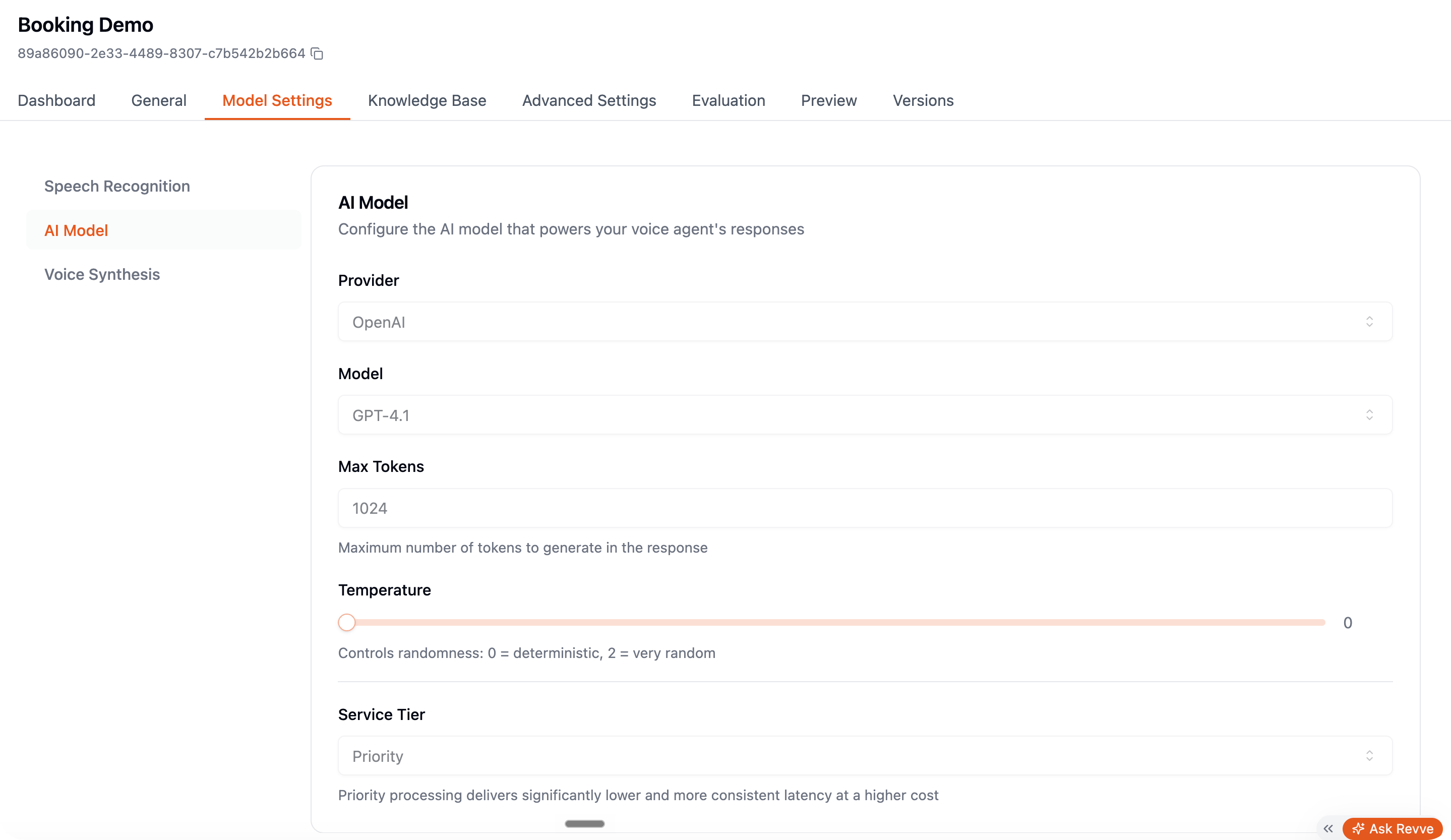 | Setting | Default | When to change |
| -------------------- | --------------- | --------------------------------------------------------------------------------------------------------------------------------------------------------------------------------------------------------------------------- |
| **Provider / Model** | — | Faster models keep the conversation snappy; more capable models handle complex policies better. If callers experience long pauses before answers, try a faster model before touching timing settings. |
| **Temperature** | 0.7 (range 0–2) | Lower toward 0.3 for compliance-sensitive calls where wording must stay consistent (collections, banking). Raise above 0.7 only for deliberately casual small-talk agents — high values risk the agent drifting off script. |
| **Max Tokens** | 4096 | Leave it. Long maximums don't make the agent talk longer — your prompt controls that. |
### Voice Synthesis
| Setting | Default | When to change |
| -------------------- | --------------- | --------------------------------------------------------------------------------------------------------------------------------------------------------------------------------------------------------------------------- |
| **Provider / Model** | — | Faster models keep the conversation snappy; more capable models handle complex policies better. If callers experience long pauses before answers, try a faster model before touching timing settings. |
| **Temperature** | 0.7 (range 0–2) | Lower toward 0.3 for compliance-sensitive calls where wording must stay consistent (collections, banking). Raise above 0.7 only for deliberately casual small-talk agents — high values risk the agent drifting off script. |
| **Max Tokens** | 4096 | Leave it. Long maximums don't make the agent talk longer — your prompt controls that. |
### Voice Synthesis
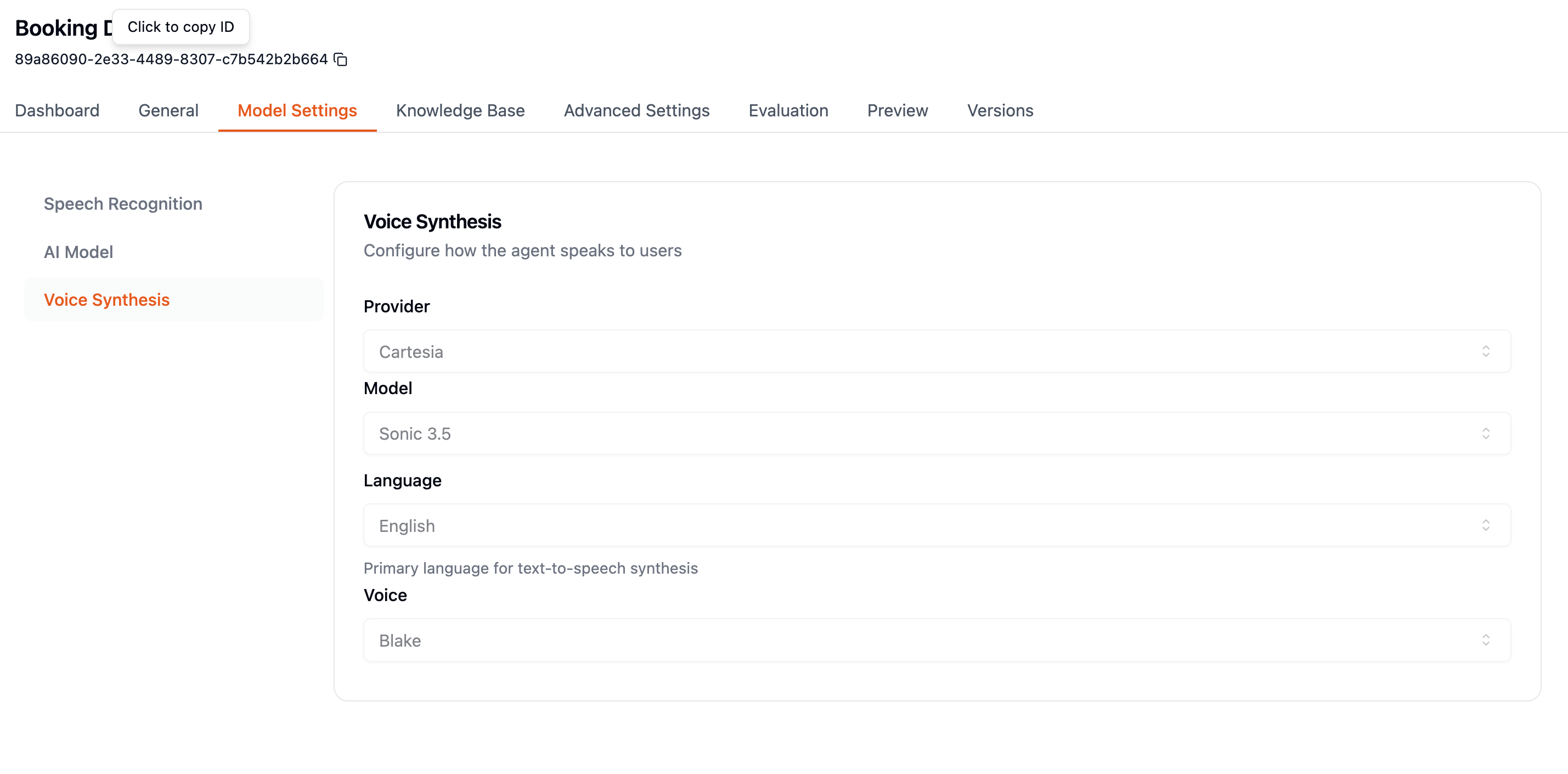 | Setting | Default | When to change |
| --------------------------------------- | ---------------- | -------------------------------------------------------------------------------------------------------------------------------------------------------------------------------------------------------------- |
| **Provider / Model / Language / Voice** | — | The voice is your brand on the phone. Test 2–3 candidates with your actual script in Preview — voices that sound great reading a sentence can stumble on your product names. |
| **Speed** | Provider default | Slow down slightly for older audiences or complex information (amounts, dates); speed up slightly for short reminder calls. |
| **Pronunciation Dictionary** | Empty | Add entries when the voice mispronounces something — your company name, a product, a person. Map the written form to a phonetic spelling. Fix mispronunciations here, not by re-spelling words in your prompt. |
## Advanced Settings
Advanced Settings is organized into sections in a left sidebar. The impactful ones in detail:
### Call Behavior
| Setting | Default | When to change |
| --------------------- | ---------------- | ------------------------------------------------------------------------------------------------------------------------------------------------------- |
| **Max Duration** | 5 minutes (1–60) | Raise for support or interview agents that legitimately need long calls. Keep short for outbound campaigns — it caps cost when a call goes nowhere. |
| **Begin Delay** | 1000 ms | Leave it — it gives the connection a beat to stabilize before the agent speaks. |
| **End After Silence** | 10 s (5–300) | How long dead air is tolerated before hanging up. Raise if your flow includes steps where callers go quiet legitimately (finding their account number). |
### Conversation
This section controls the *feel* of the conversation — it's where voice agents are won or lost.
**Conversation Start**
| Setting | Default | Guidance |
| ------------------------------------------ | ------- | ---------------------------------------------------------------------------------------------------------------------------------------------------------------------------------------------------------------------------------------------------------------------------------------------------------- |
| **AI Speaks First** + **Initial Greeting** | Off | Turn on for outbound calls (the agent called, it should explain why). For inbound, answering with a greeting is also the norm — most agents want this on with a short, branded greeting. |
| **Allow caller to interrupt the greeting** | Off | Sub-toggle under **AI Speaks First**. Off: the greeting always plays in full. On: callers can barge in and skip ahead. Turn on for repeat-contact outbound — callers who already know why you're calling shouldn't have to sit through the pitch. Keep off when the greeting carries required disclosures. |
**Turn Handling** — how the agent decides the caller finished speaking, and how fast it replies:
| Setting | Default | When to change |
| ------------------------ | ------------------------------ | -------------------------------------------------------------------------------------------------------------------------------------------------------------------------------------------------------------------------------------------------------------------------------------------------------------------------------------------------------------------------------------------------------- |
| **Turn detection model** | Voice Activity Detection (VAD) | VAD detects silence — fast, but can cut in during natural pauses. Switch to a **Smart Turn Detection** model when callers are being interrupted mid-thought; it understands sentence completeness, not just silence. Three variants: **English**, **Multilingual**, and **Vietnamese** — the Vietnamese model is tuned for Vietnamese speech patterns and is the best pick for Vietnamese conversations. |
| **Smart turn threshold** | 0.7 (0–1) | Shown when a Smart Turn model is selected; stored per speech language. How confident the model must be that the caller finished their turn before the agent replies. Agent still cutting in → raise it (waits for clearer end-of-turn cues, at the cost of slower responses). Agent feels slow to answer → lower it, accepting it may occasionally cut in. Move in 0.05 steps. |
| **Min silence duration** | 0.3 s | The classic trade-off knob. Callers getting cut off mid-pause → raise toward 0.8–1.0 s. Agent feels sluggish → lower slightly. Move in 0.1 s steps and re-test. (Agents created before this field existed show 0.55 s until you save new settings.) |
| **Min speech duration** | 0.05 s | Leave it — filters out clicks and pops from counting as speech. |
| **Activation threshold** | 0.5 (0–1) | Raise on noisy lines (background TV, street noise triggers the agent to stop talking); lower for quiet, soft-spoken callers it fails to hear. |
| **Prefix padding** | 0.5 s | Leave it — audio buffered before detected speech so first syllables aren't clipped. |
| **Response timing** | Fixed, 0.5–3.0 s wait | "Min delay" is the shortest pause before responding; "Max delay" the longest. Tighten the max for snappy reminder calls; widen for thoughtful, consultative conversations. |
**Interruption Handling**
| Setting | Default | When to change |
| --------------------- | ------- | -------------------------------------------------------------------------------------------------------------------------------------------------------------------------------------------------------------------------------------------------------------------------------------------------------------------------------------------------------------- |
| **Interruption mode** | VAD | VAD treats *any* voice longer than the minimum duration as an interruption. Switch to **Adaptive** when backchannels — callers saying "uh-huh", "right" — keep stopping the agent mid-sentence. Adaptive ignores them. |
| **Min duration** | — | Raise it if coughs and short noises interrupt the agent. |
| **Backchannel words** | Empty | VAD mode only. Words the agent ignores as interruptions — filler acknowledgments like the Vietnamese "vâng", "dạ", "ạ". Type a word and press Enter to add it. Use this when specific short acknowledgments keep stopping the agent but you want to stay in VAD mode; switching to **Adaptive** is the broader alternative. Empty list = suppression disabled. |
**Quiet Speech Handling**
Prompts callers who are speaking too quietly to speak up — worth enabling for audiences skewing older or soft-spoken, or calls prone to a noisy line (driving, retail floor, poor mic).
| Setting | Default | When to change |
| --------------------------------------- | ---------------- | -------------------------------------------------------------------------------------------------------------------------------------------------------------------------------------------------------------- |
| **Provider / Model / Language / Voice** | — | The voice is your brand on the phone. Test 2–3 candidates with your actual script in Preview — voices that sound great reading a sentence can stumble on your product names. |
| **Speed** | Provider default | Slow down slightly for older audiences or complex information (amounts, dates); speed up slightly for short reminder calls. |
| **Pronunciation Dictionary** | Empty | Add entries when the voice mispronounces something — your company name, a product, a person. Map the written form to a phonetic spelling. Fix mispronunciations here, not by re-spelling words in your prompt. |
## Advanced Settings
Advanced Settings is organized into sections in a left sidebar. The impactful ones in detail:
### Call Behavior
| Setting | Default | When to change |
| --------------------- | ---------------- | ------------------------------------------------------------------------------------------------------------------------------------------------------- |
| **Max Duration** | 5 minutes (1–60) | Raise for support or interview agents that legitimately need long calls. Keep short for outbound campaigns — it caps cost when a call goes nowhere. |
| **Begin Delay** | 1000 ms | Leave it — it gives the connection a beat to stabilize before the agent speaks. |
| **End After Silence** | 10 s (5–300) | How long dead air is tolerated before hanging up. Raise if your flow includes steps where callers go quiet legitimately (finding their account number). |
### Conversation
This section controls the *feel* of the conversation — it's where voice agents are won or lost.
**Conversation Start**
| Setting | Default | Guidance |
| ------------------------------------------ | ------- | ---------------------------------------------------------------------------------------------------------------------------------------------------------------------------------------------------------------------------------------------------------------------------------------------------------- |
| **AI Speaks First** + **Initial Greeting** | Off | Turn on for outbound calls (the agent called, it should explain why). For inbound, answering with a greeting is also the norm — most agents want this on with a short, branded greeting. |
| **Allow caller to interrupt the greeting** | Off | Sub-toggle under **AI Speaks First**. Off: the greeting always plays in full. On: callers can barge in and skip ahead. Turn on for repeat-contact outbound — callers who already know why you're calling shouldn't have to sit through the pitch. Keep off when the greeting carries required disclosures. |
**Turn Handling** — how the agent decides the caller finished speaking, and how fast it replies:
| Setting | Default | When to change |
| ------------------------ | ------------------------------ | -------------------------------------------------------------------------------------------------------------------------------------------------------------------------------------------------------------------------------------------------------------------------------------------------------------------------------------------------------------------------------------------------------- |
| **Turn detection model** | Voice Activity Detection (VAD) | VAD detects silence — fast, but can cut in during natural pauses. Switch to a **Smart Turn Detection** model when callers are being interrupted mid-thought; it understands sentence completeness, not just silence. Three variants: **English**, **Multilingual**, and **Vietnamese** — the Vietnamese model is tuned for Vietnamese speech patterns and is the best pick for Vietnamese conversations. |
| **Smart turn threshold** | 0.7 (0–1) | Shown when a Smart Turn model is selected; stored per speech language. How confident the model must be that the caller finished their turn before the agent replies. Agent still cutting in → raise it (waits for clearer end-of-turn cues, at the cost of slower responses). Agent feels slow to answer → lower it, accepting it may occasionally cut in. Move in 0.05 steps. |
| **Min silence duration** | 0.3 s | The classic trade-off knob. Callers getting cut off mid-pause → raise toward 0.8–1.0 s. Agent feels sluggish → lower slightly. Move in 0.1 s steps and re-test. (Agents created before this field existed show 0.55 s until you save new settings.) |
| **Min speech duration** | 0.05 s | Leave it — filters out clicks and pops from counting as speech. |
| **Activation threshold** | 0.5 (0–1) | Raise on noisy lines (background TV, street noise triggers the agent to stop talking); lower for quiet, soft-spoken callers it fails to hear. |
| **Prefix padding** | 0.5 s | Leave it — audio buffered before detected speech so first syllables aren't clipped. |
| **Response timing** | Fixed, 0.5–3.0 s wait | "Min delay" is the shortest pause before responding; "Max delay" the longest. Tighten the max for snappy reminder calls; widen for thoughtful, consultative conversations. |
**Interruption Handling**
| Setting | Default | When to change |
| --------------------- | ------- | -------------------------------------------------------------------------------------------------------------------------------------------------------------------------------------------------------------------------------------------------------------------------------------------------------------------------------------------------------------- |
| **Interruption mode** | VAD | VAD treats *any* voice longer than the minimum duration as an interruption. Switch to **Adaptive** when backchannels — callers saying "uh-huh", "right" — keep stopping the agent mid-sentence. Adaptive ignores them. |
| **Min duration** | — | Raise it if coughs and short noises interrupt the agent. |
| **Backchannel words** | Empty | VAD mode only. Words the agent ignores as interruptions — filler acknowledgments like the Vietnamese "vâng", "dạ", "ạ". Type a word and press Enter to add it. Use this when specific short acknowledgments keep stopping the agent but you want to stay in VAD mode; switching to **Adaptive** is the broader alternative. Empty list = suppression disabled. |
**Quiet Speech Handling**
Prompts callers who are speaking too quietly to speak up — worth enabling for audiences skewing older or soft-spoken, or calls prone to a noisy line (driving, retail floor, poor mic).
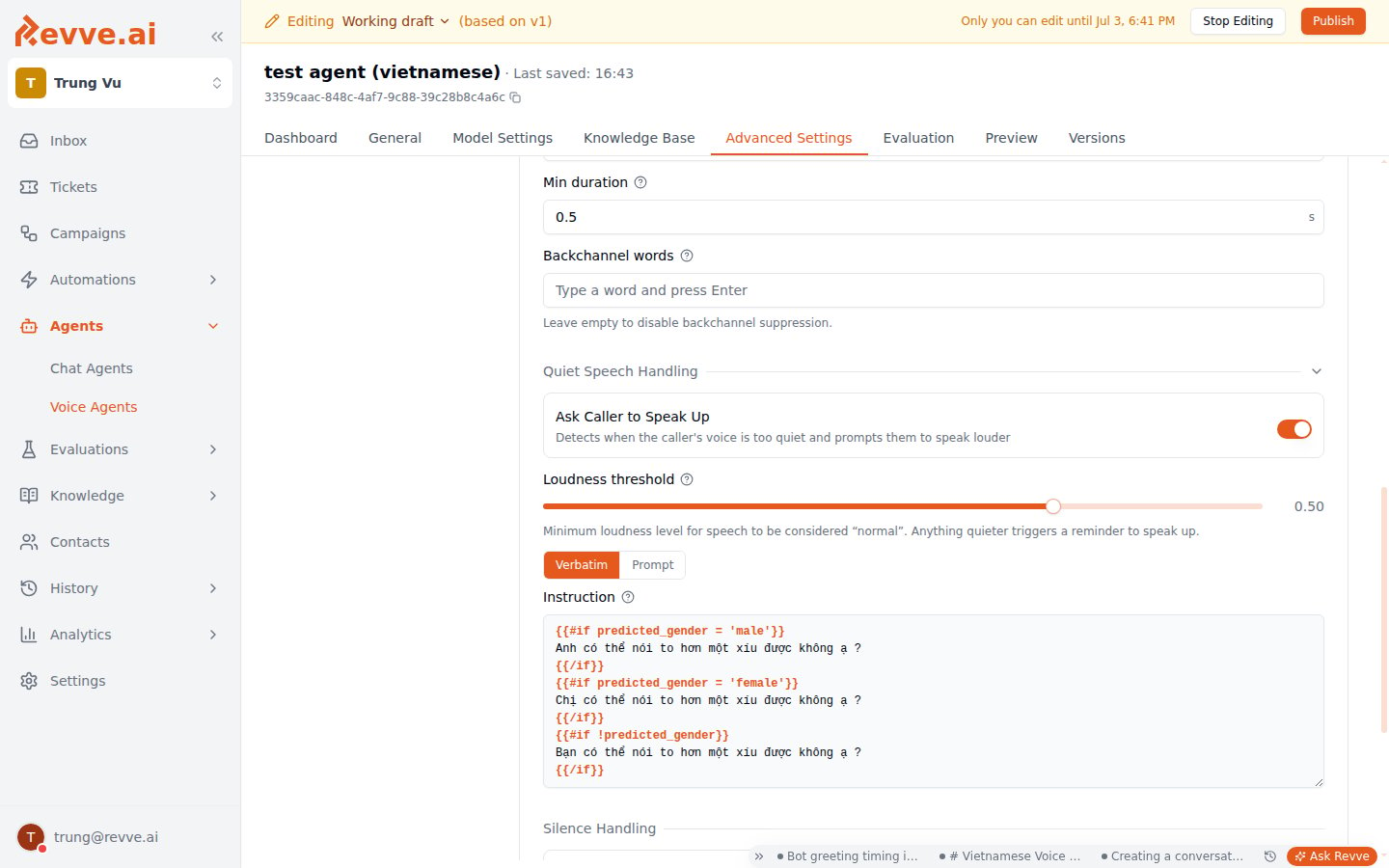 | Setting | Default | When to change |
| -------------------------- | -------------------------------------- | ----------------------------------------------------------------------------------------------------------------------------------------------------------------------------------------------------------------------------------------------------------------------------------------------------------------------------------------------------------------- |
| **Ask Caller to Speak Up** | Off | Detects when the caller's voice is too quiet and prompts them to speak louder. Turn on for elderly or soft-spoken audiences, or calls likely to bury the caller's voice in background noise. |
| **Loudness threshold** | 0.50 (slider, 0–0.70) | Shown only when the toggle above is on. Minimum loudness for speech to count as "normal" — anything quieter triggers the reminder. Raise it if genuinely quiet callers aren't triggering the nudge; the slider caps at 0.70 so you can't accidentally flag normal conversational speech, which would otherwise loop the agent on the speak-up nudge forever. |
| **Low-speech prompt** | **Verbatim** mode, Vietnamese template | Shown only when the toggle above is on. **Verbatim** speaks fixed text word-for-word; **Prompt** hands the LLM an instruction and lets it generate the reply instead. Both default texts are in Vietnamese — for a non-Vietnamese agent, replace both the Verbatim template and the Prompt instruction with your own language; there's no automatic localization. |
The runtime caps this at 2 speak-up prompts per call session, so a caller who stays quiet won't get nagged repeatedly.
**Silence Handling**
| Setting | Default | When to change |
| ------------------------------------ | ------- | ------------------------------------------------------------------------------------------------------------------------------ |
| **Follow Up on Silence** | Off | Turn on for outbound and qualification calls — the agent re-engages ("Are you still there?") instead of waiting out the clock. |
| **Silence Timeout / Max Follow-ups** | 5 s / 3 | Defaults are right for most flows. |
**Environment**
| Setting | Default | When to change |
| ---------------------- | ------- | -------------------------------------------------------------------------------------------------------------------------------------------------------------- |
| **Noise Cancellation** | Off | Turn on when callers are in noisy environments (drivers, retail floors) and transcription quality suffers. |
| **Ambient Sound** | None | Adds background ambience (office, city) to the agent's side. A subtle office ambience can make an agent feel less sterile; skip it unless you've A/B-listened. |
### Voicemail
Off by default — when voicemail is detected the call simply hangs up. Enable **voicemail detection** to leave a message instead:
| Setting | Default | When to change |
| -------------------------- | -------------------------------------- | ----------------------------------------------------------------------------------------------------------------------------------------------------------------------------------------------------------------------------------------------------------------------------------------------------------------------------------------------------------------- |
| **Ask Caller to Speak Up** | Off | Detects when the caller's voice is too quiet and prompts them to speak louder. Turn on for elderly or soft-spoken audiences, or calls likely to bury the caller's voice in background noise. |
| **Loudness threshold** | 0.50 (slider, 0–0.70) | Shown only when the toggle above is on. Minimum loudness for speech to count as "normal" — anything quieter triggers the reminder. Raise it if genuinely quiet callers aren't triggering the nudge; the slider caps at 0.70 so you can't accidentally flag normal conversational speech, which would otherwise loop the agent on the speak-up nudge forever. |
| **Low-speech prompt** | **Verbatim** mode, Vietnamese template | Shown only when the toggle above is on. **Verbatim** speaks fixed text word-for-word; **Prompt** hands the LLM an instruction and lets it generate the reply instead. Both default texts are in Vietnamese — for a non-Vietnamese agent, replace both the Verbatim template and the Prompt instruction with your own language; there's no automatic localization. |
The runtime caps this at 2 speak-up prompts per call session, so a caller who stays quiet won't get nagged repeatedly.
**Silence Handling**
| Setting | Default | When to change |
| ------------------------------------ | ------- | ------------------------------------------------------------------------------------------------------------------------------ |
| **Follow Up on Silence** | Off | Turn on for outbound and qualification calls — the agent re-engages ("Are you still there?") instead of waiting out the clock. |
| **Silence Timeout / Max Follow-ups** | 5 s / 3 | Defaults are right for most flows. |
**Environment**
| Setting | Default | When to change |
| ---------------------- | ------- | -------------------------------------------------------------------------------------------------------------------------------------------------------------- |
| **Noise Cancellation** | Off | Turn on when callers are in noisy environments (drivers, retail floors) and transcription quality suffers. |
| **Ambient Sound** | None | Adds background ambience (office, city) to the agent's side. A subtle office ambience can make an agent feel less sterile; skip it unless you've A/B-listened. |
### Voicemail
Off by default — when voicemail is detected the call simply hangs up. Enable **voicemail detection** to leave a message instead:
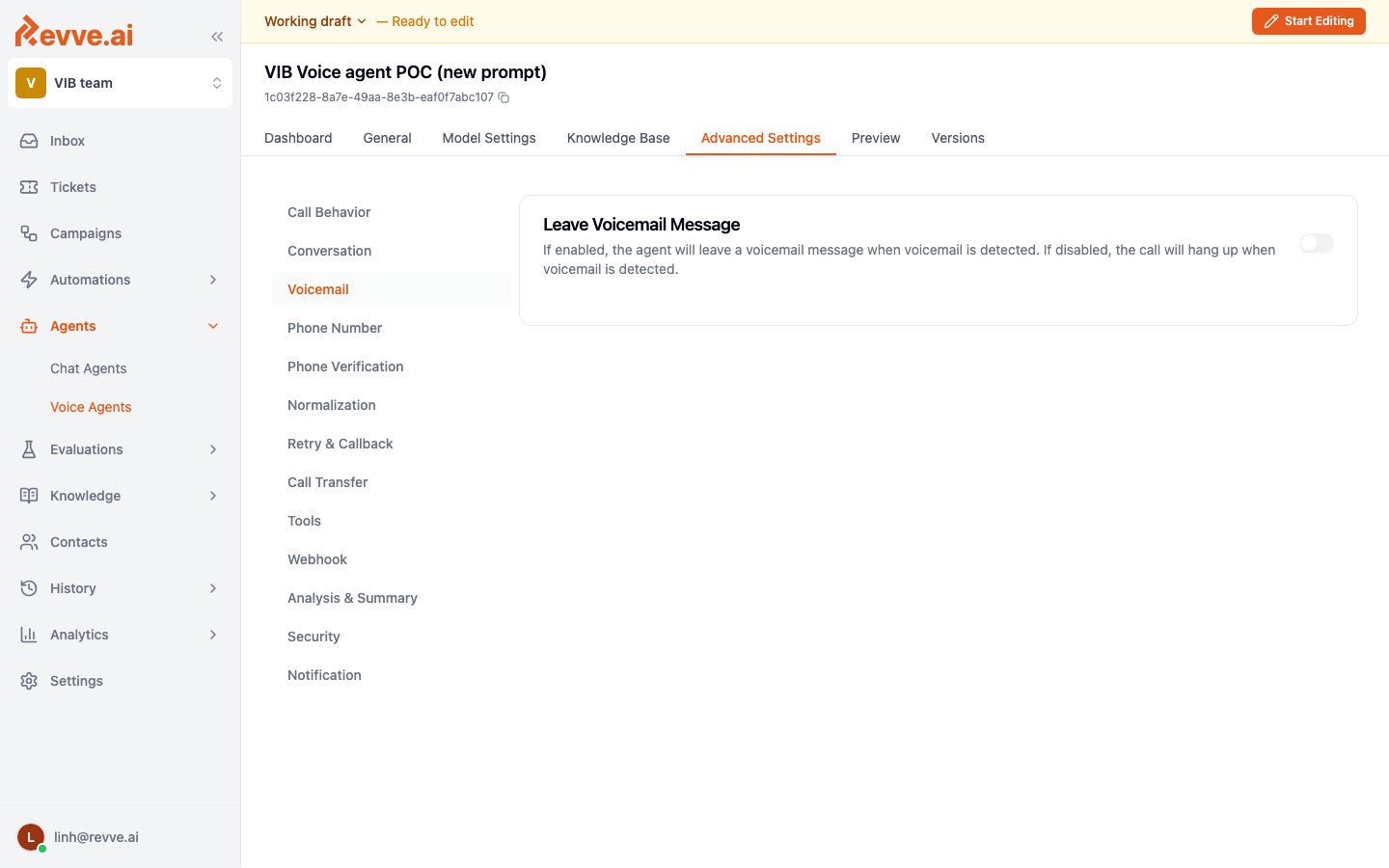 * **Voicemail Message** supports `{{contact}}` placeholders — for example: "Hi `{{firstName}}`, this is Acme calling about your application…"
* **Detection Timeout** (default 5000 ms): how long to listen before deciding it's a machine. Leave it unless detection misfires.
For outbound campaigns, enabling voicemail is usually worth it — a personalized message measurably improves callback rates versus silent hangups.
### Call Transfer
Lets the AI hand the call to a human, with a spoken handover message:
| Setting | Options | How to choose |
| -------------------- | ------------------------------------------------------------------ | -------------------------------------------------------------------------------------------------------------------------------------------------------------------------------------------------------------------------------------------------------------------------------------------------------------------- |
| **Transfer To** | **Revve User (in-app agent)** / **SIP Address** / **Phone Number** | Revve User routes the call to an available human agent in the Revve app — no external number needed. SIP Address targets a SIP endpoint. Phone Number dials an external number in E.164 format (`+84775352590`). |
| **Transfer Type** | **Bridge Transfer** (default) / **Cold Transfer** | Bridge: a warm consult transfer — the caller is held with music while the AI privately briefs the human with the call summary, then connects them and goes silent (but keeps logging). Cold: the call is handed off entirely, no further logging — choose this for compliance contexts where the AI must fully exit. |
| **Transfer Message** | Free text | What the AI says before transferring ("Let me connect you with a specialist — one moment."). Always set one; silent transfers feel like being hung up on. |
See [Call Transfer](/docs/voice-agents/call-transfer) for the full warm-transfer workflow, including how in-app agents receive and accept transfers.
### Everything else
The remaining sections are covered in depth on [Voice Agent Advanced Capabilities](/docs/voice-agents/voice-agent-advanced-capabilities) — the short version:
| Section | What it's for |
| ---------------------- | ---------------------------------------------------------------------------------------------------------------------------------------------------------------------------------------------------------------------------------------------------------------------------------------------------------------------- |
| **Phone Number** | Pick the outbound caller ID — a single team number or a number pool (a random pool number per call). |
| **Phone Verification** | Confirm the caller's identity by having them state their phone number, checked against the number already on file for that contact. |
| **Normalization** | Normalize spoken data like addresses and license plates into structured formats. |
| **Retry & Callback** | Auto-retry failed outbound calls (busy, no answer, failed) and let customers request callbacks. |
| **Tools** | Attach custom tools (API calls, SMS sending) the agent can use mid-call, plus presets: two calendar tools, a ticket-creation tool, and a deterministic value-validation tool. Not every preset in the dropdown works on a phone call — see [Voice Agent Tools](/docs/voice-agents/voice-agent-tools) before you attach one. |
| **Webhook** | Send call events to a URL on your side. |
| **Analysis & Summary** | Configure the post-call summary and the data fields extracted from each call (these appear in Call History). |
| **Security** | Sensitive-data handling for this agent's calls. |
| **Notification** | Alert your team about call outcomes. |
## A tuning workflow that works
1. Ship with defaults. Make 5–10 test calls in **Preview**, including a noisy-environment call from your phone.
2. Read the transcripts. Transcription errors → fix **Language**/**Key Terms** first; everything downstream depends on hearing correctly.
3. Fix the single most annoying rhythm problem (cutting off / sluggishness) with **one** turn-handling change, re-test, repeat.
4. Only then polish: voicemail message, transfer message, pronunciation dictionary.
## What's Next
* [Voice Agent Evaluation](/docs/voice-agents/voice-agent-evaluation) — automatically grade completed calls against a weighted set of metrics.
* [Voice Agent Tools](/docs/voice-agents/voice-agent-tools) — every Tools-tab preset, and which ones don't work on a phone call.
* [Call Transfer](/docs/voice-agents/call-transfer) — the full warm-transfer workflow, including routing to in-app agents.
* [Do Not Call List](/docs/voice-agents/do-not-call-list) — the team-wide list every outbound call is checked against before it's placed.
* [Creating a Campaign](/docs/campaigns/creating-a-campaign) — drive outbound calls with your tuned agent.
* **Voicemail Message** supports `{{contact}}` placeholders — for example: "Hi `{{firstName}}`, this is Acme calling about your application…"
* **Detection Timeout** (default 5000 ms): how long to listen before deciding it's a machine. Leave it unless detection misfires.
For outbound campaigns, enabling voicemail is usually worth it — a personalized message measurably improves callback rates versus silent hangups.
### Call Transfer
Lets the AI hand the call to a human, with a spoken handover message:
| Setting | Options | How to choose |
| -------------------- | ------------------------------------------------------------------ | -------------------------------------------------------------------------------------------------------------------------------------------------------------------------------------------------------------------------------------------------------------------------------------------------------------------- |
| **Transfer To** | **Revve User (in-app agent)** / **SIP Address** / **Phone Number** | Revve User routes the call to an available human agent in the Revve app — no external number needed. SIP Address targets a SIP endpoint. Phone Number dials an external number in E.164 format (`+84775352590`). |
| **Transfer Type** | **Bridge Transfer** (default) / **Cold Transfer** | Bridge: a warm consult transfer — the caller is held with music while the AI privately briefs the human with the call summary, then connects them and goes silent (but keeps logging). Cold: the call is handed off entirely, no further logging — choose this for compliance contexts where the AI must fully exit. |
| **Transfer Message** | Free text | What the AI says before transferring ("Let me connect you with a specialist — one moment."). Always set one; silent transfers feel like being hung up on. |
See [Call Transfer](/docs/voice-agents/call-transfer) for the full warm-transfer workflow, including how in-app agents receive and accept transfers.
### Everything else
The remaining sections are covered in depth on [Voice Agent Advanced Capabilities](/docs/voice-agents/voice-agent-advanced-capabilities) — the short version:
| Section | What it's for |
| ---------------------- | ---------------------------------------------------------------------------------------------------------------------------------------------------------------------------------------------------------------------------------------------------------------------------------------------------------------------- |
| **Phone Number** | Pick the outbound caller ID — a single team number or a number pool (a random pool number per call). |
| **Phone Verification** | Confirm the caller's identity by having them state their phone number, checked against the number already on file for that contact. |
| **Normalization** | Normalize spoken data like addresses and license plates into structured formats. |
| **Retry & Callback** | Auto-retry failed outbound calls (busy, no answer, failed) and let customers request callbacks. |
| **Tools** | Attach custom tools (API calls, SMS sending) the agent can use mid-call, plus presets: two calendar tools, a ticket-creation tool, and a deterministic value-validation tool. Not every preset in the dropdown works on a phone call — see [Voice Agent Tools](/docs/voice-agents/voice-agent-tools) before you attach one. |
| **Webhook** | Send call events to a URL on your side. |
| **Analysis & Summary** | Configure the post-call summary and the data fields extracted from each call (these appear in Call History). |
| **Security** | Sensitive-data handling for this agent's calls. |
| **Notification** | Alert your team about call outcomes. |
## A tuning workflow that works
1. Ship with defaults. Make 5–10 test calls in **Preview**, including a noisy-environment call from your phone.
2. Read the transcripts. Transcription errors → fix **Language**/**Key Terms** first; everything downstream depends on hearing correctly.
3. Fix the single most annoying rhythm problem (cutting off / sluggishness) with **one** turn-handling change, re-test, repeat.
4. Only then polish: voicemail message, transfer message, pronunciation dictionary.
## What's Next
* [Voice Agent Evaluation](/docs/voice-agents/voice-agent-evaluation) — automatically grade completed calls against a weighted set of metrics.
* [Voice Agent Tools](/docs/voice-agents/voice-agent-tools) — every Tools-tab preset, and which ones don't work on a phone call.
* [Call Transfer](/docs/voice-agents/call-transfer) — the full warm-transfer workflow, including routing to in-app agents.
* [Do Not Call List](/docs/voice-agents/do-not-call-list) — the team-wide list every outbound call is checked against before it's placed.
* [Creating a Campaign](/docs/campaigns/creating-a-campaign) — drive outbound calls with your tuned agent.