> ## Documentation Index
> Fetch the complete documentation index at: https://www.revve.ai/docs/llms.txt
> Use this file to discover all available pages before exploring further.
# Voice Agent Evaluation
> Automatically score every completed call against a weighted set of metrics — deterministic checks and LLM-judged criteria — so you know an agent is performing before you find out from a customer complaint.
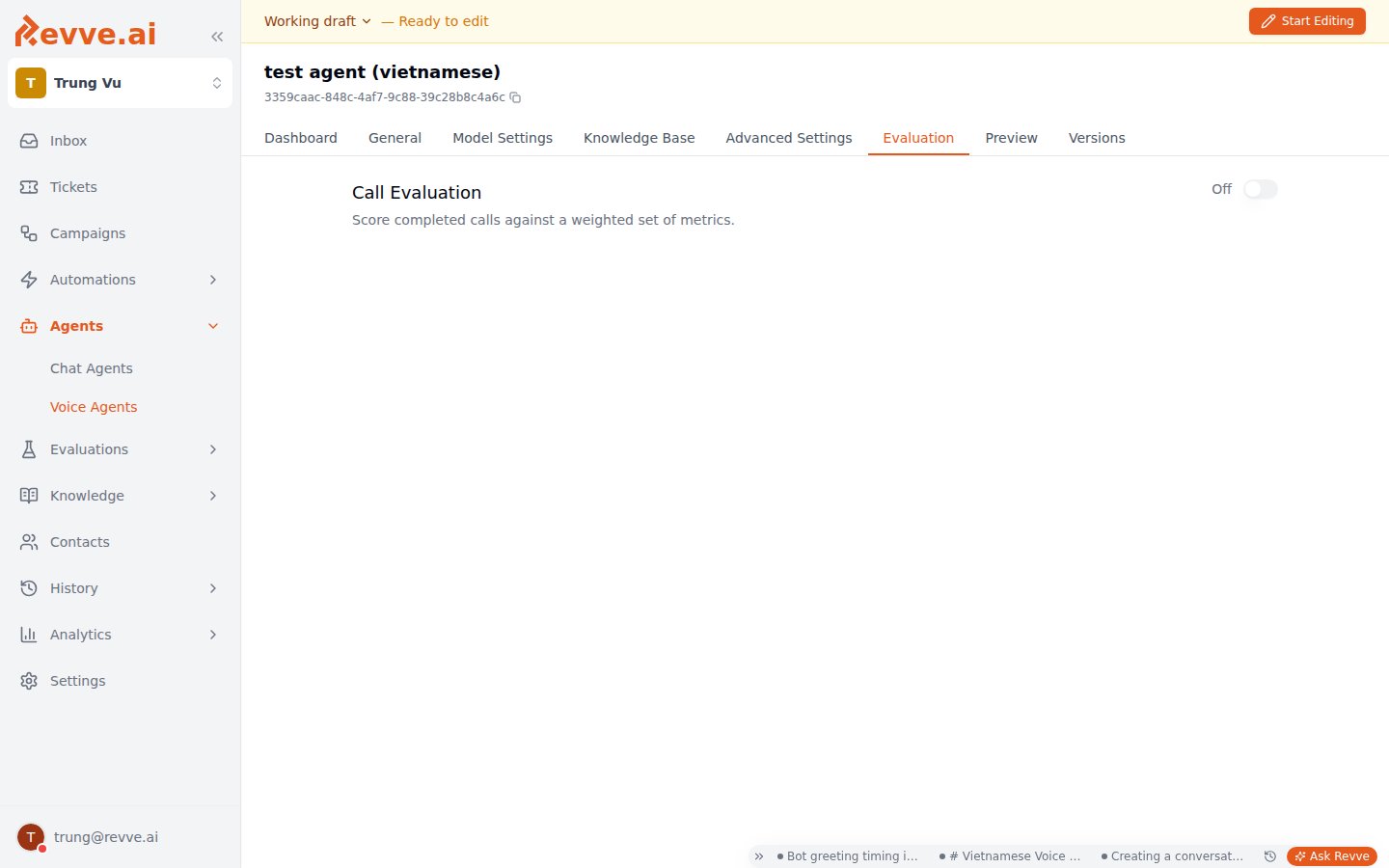
The **Evaluation** tab (labeled **Call Evaluation** in the app, subtitled "Score completed calls against a weighted set of metrics") defines a grading policy for one Voice Agent. Once you enable it, every call the agent completes is graded automatically against the metrics you configure — no one has to sit down and listen to calls to know whether the agent is doing its job.
This is separate from the **General** / **Model Settings** / **Advanced Settings** tabs covered in [Voice Agent Settings](/docs/voice-agents/voice-agent-settings). It's its own tab because it isn't a call-behavior setting — it's a policy that runs *after* the call, against the finished transcript and tool logs.
 Don't confuse this with the **Human Feedback** widget you'll see on an individual call in Call History, which lets a reviewer manually mark that one call as failed and pick an error category. That's a person making an ad-hoc judgment call about a single call. The Evaluation tab is the opposite: an automatic, policy-driven grading system that scores every call the same way, without a human involved.
## How it works
1. **Turn it on.** The whole feature is gated behind a single **Enable** switch, off by default. No metric runs, and nothing appears in Call History, until you flip it on.
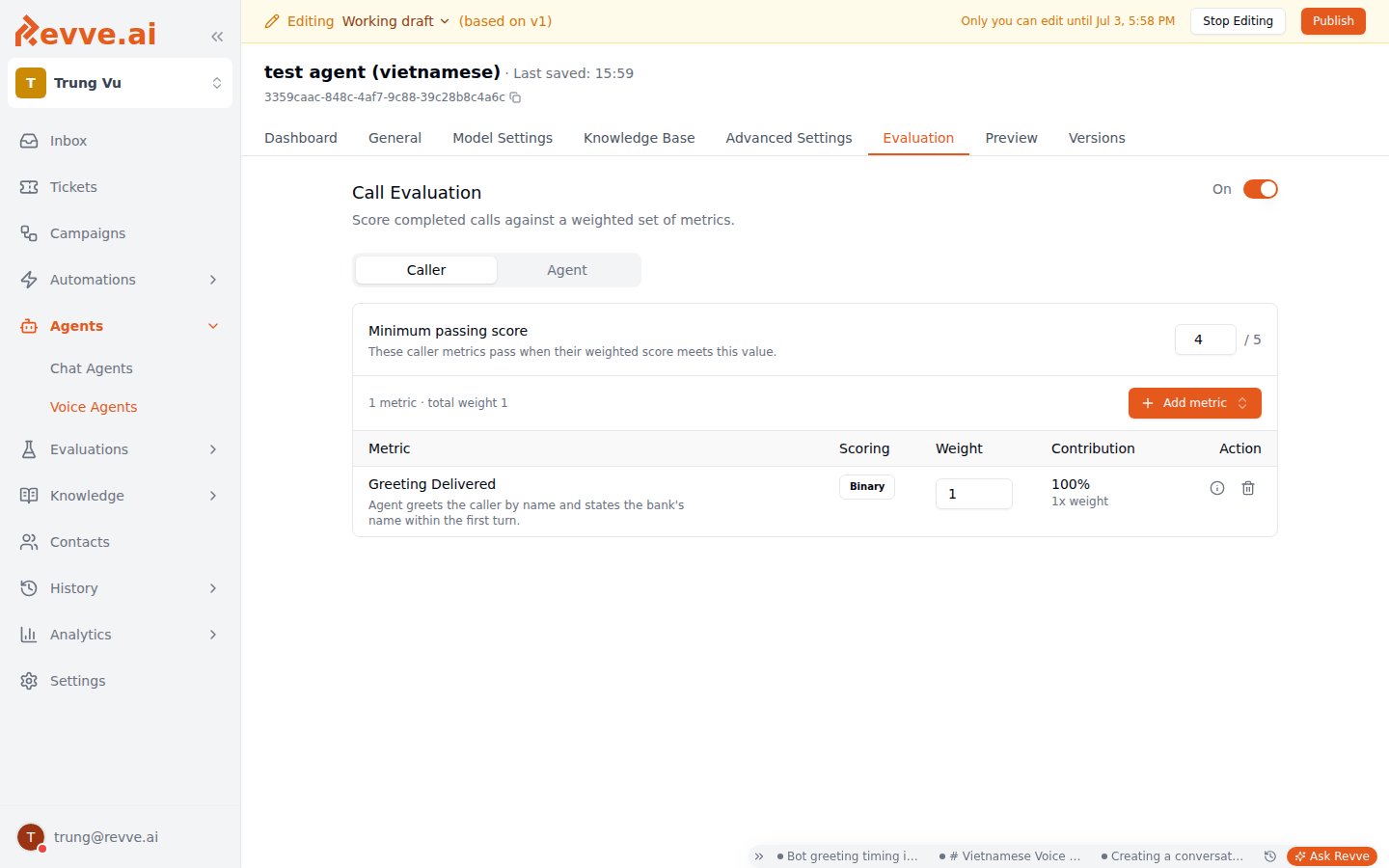
2. **Configure two independent groups: Caller and Agent.** Each has its own set of metrics, its own weights, and its own minimum pass score — grading how well the *caller* engaged is a different question from grading how well the *agent* performed, so they're scored separately rather than blended into one number.
3. **Add metrics from your team's library, or create one inline.** Metrics belong to your team, not to a single agent — you can reuse the same metric across multiple Voice Agents. Adding a metric to a group lets you set its **weight** (default 1); the pass bar itself is the group's **minimum passing score**, not a per-metric threshold. See [Evaluation Metrics](/docs/evaluations/evaluation-metrics) for the standalone library page — the same metrics are also usable by [Evaluators](/docs/evaluations/creating-an-evaluator) and Scorecards.
4. **A call finishes, evaluation runs, results land in Call History.** No manual step — every completed call for an enabled agent gets scored against both groups automatically.
Once enabled, the tab switches to separate **Caller** / **Agent** tabs, a **Minimum passing score**, and a table of the group's metrics:
Don't confuse this with the **Human Feedback** widget you'll see on an individual call in Call History, which lets a reviewer manually mark that one call as failed and pick an error category. That's a person making an ad-hoc judgment call about a single call. The Evaluation tab is the opposite: an automatic, policy-driven grading system that scores every call the same way, without a human involved.
## How it works
1. **Turn it on.** The whole feature is gated behind a single **Enable** switch, off by default. No metric runs, and nothing appears in Call History, until you flip it on.
2. **Configure two independent groups: Caller and Agent.** Each has its own set of metrics, its own weights, and its own minimum pass score — grading how well the *caller* engaged is a different question from grading how well the *agent* performed, so they're scored separately rather than blended into one number.
3. **Add metrics from your team's library, or create one inline.** Metrics belong to your team, not to a single agent — you can reuse the same metric across multiple Voice Agents. Adding a metric to a group lets you set its **weight** (default 1); the pass bar itself is the group's **minimum passing score**, not a per-metric threshold. See [Evaluation Metrics](/docs/evaluations/evaluation-metrics) for the standalone library page — the same metrics are also usable by [Evaluators](/docs/evaluations/creating-an-evaluator) and Scorecards.
4. **A call finishes, evaluation runs, results land in Call History.** No manual step — every completed call for an enabled agent gets scored against both groups automatically.
Once enabled, the tab switches to separate **Caller** / **Agent** tabs, a **Minimum passing score**, and a table of the group's metrics:
 ## Metric types
Every metric is one of two types, chosen when it's created:
| Type | How it's scored | Use it for |
| ----------------- | ------------------------------------------------------------------------------------------------------ | ----------------------------------------------------------------------------------------------------------------------- |
| **Deterministic** | Binary — pass/fail only, never a numeric score. A rule checked mechanically against the call. | Facts you can verify from logs: did a tool get called, does a message contain a phrase. No ambiguity, no judgment call. |
| **LLM Judge** | **Binary** (pass/fail) or **Scale 1-5** — a free-text prompt sent to an LLM along with the transcript. | Anything that requires judgment: tone, adherence to a policy, whether the agent handled an objection well. |
### Deterministic checks
Seven check types are available:
| Check | What it verifies |
| --------------------- | ------------------------------------------ |
| **Tool Called** | Tool appears in the call's tool call logs. |
| **Tool Not Called** | Tool does NOT appear in the logs. |
| **Tool Called With** | Tool was called with matching parameters. |
| **Contains Text** | An agent message contains a substring. |
| **Not Contains Text** | The agent never says a given substring. |
| **Regex Match** | An agent message matches a regex pattern. |
| **Turn Count** | The conversation completed within N turns. |
These are pass/fail because they're facts, not opinions — no LLM call is needed, so they're also cheap and instant.
### LLM Judge metrics
An LLM Judge metric is a grading prompt you write, sent to an LLM alongside the call transcript. Two settings shape how it's judged:
* **Scoring** — **Binary** for a straight pass/fail, or **Scale 1-5** when you want gradations. For Scale 1-5, you write a **Score Rubric**: a description of what earns each of score\_1 through score\_5, specific to that metric. There's no generic 1-bad/5-good scale — you have to tell the judge what a "3" means for *this* metric, or the score is meaningless.
* **Speaker scope** — whether the judge should focus on the **Agent**'s lines or the **Caller**'s lines when scoring (the other speaker's lines stay in the transcript as context, but shouldn't drive the score). Defaults to **Agent**.
## Scoring math
Understanding how a group's final score is calculated matters, because it isn't a simple average of everything:
* **Binary metrics** (all deterministic metrics, plus any LLM Judge metric scored Binary) contribute pass/fail only — no numeric score.
* **Scale 1-5 metrics** contribute a `score` and a `weighted_score` (score × weight).
* A group's **pass rate** counts every metric that passed, binary and scale alike.
* A group's **final score** only averages the scale metrics — binary metrics don't factor into the numeric score, only into the pass rate.
* The group passes overall when its final score clears that group's **minimum pass score**, which defaults to **4** (out of 5) and is set independently for Caller and Agent.
If a group has only binary metrics, its final score has nothing to average and the pass/fail call comes from the pass rate against binary checks alone — which is why mixing in at least one Scale 1-5 metric is worth doing for a group you want a real numeric trend on, not just a pass/fail.
## Where results show up
Call History shows a compact badge on every graded call: separate **Caller** and **Agent** score chips (person icon and bot icon), each colored independently — green for passed, red for failed, gray while evaluation is still running, was skipped, or hit an error (hover for the error detail). Older calls that predate the Caller/Agent split show a single combined badge instead.
Open a call's detail view for the full breakdown: each group's final score out of 5, its pass threshold, and the result of every individual metric that ran.
## An example: validating identity before discussing account details
Evaluation metrics are generic — nothing here is banking-specific — but they're the kind of building block a bank would use to enforce a hard rule mechanically instead of hoping the agent's prompt is followed. For example, an **Agent**-group metric using the **Tool Called** check, verifying that the **Built-in Validate** tool (see [Voice Agent Tools](/docs/voice-agents/voice-agent-tools)) ran before the call moved on to discuss account specifics. Because it's a deterministic check, this catches a real process violation on every single call — no LLM judgment involved, no chance of the check itself being fooled by a plausible-sounding transcript.
This is a different mechanism from [Phone Verification](/docs/voice-agents/voice-agent-settings), which confirms a caller's identity by matching a spoken phone number against the one on file for that contact, at call time. Built-in Validate is a general-purpose tool for validating a spoken field — an account number, an ID — against a regex, and using it as an Evaluation metric is one way to confirm the agent actually invoked it, after the fact.
This is one example configuration built from generic metric types, not a claim that Revve ships a banking-specific evaluation feature. Any team can define the same kind of check for whatever field or tool call matters to their process.
## The trap: enabled with no metrics
Turning on **Enable** without adding any metrics to a group produces an empty, meaningless result for that group — there's nothing to grade against. Add at least one metric to each group you care about (Caller, Agent, or both) before you rely on the scores in Call History. A single well-chosen deterministic check is more useful than an enabled toggle with nothing behind it.
## What's Next
* [Voice Agent Tools](/docs/voice-agents/voice-agent-tools) — set up the Built-in Validate tool used in the example above.
* [Voice Agent Settings](/docs/voice-agents/voice-agent-settings) — the rest of the Voice Agent configuration, including Phone Verification.
## Metric types
Every metric is one of two types, chosen when it's created:
| Type | How it's scored | Use it for |
| ----------------- | ------------------------------------------------------------------------------------------------------ | ----------------------------------------------------------------------------------------------------------------------- |
| **Deterministic** | Binary — pass/fail only, never a numeric score. A rule checked mechanically against the call. | Facts you can verify from logs: did a tool get called, does a message contain a phrase. No ambiguity, no judgment call. |
| **LLM Judge** | **Binary** (pass/fail) or **Scale 1-5** — a free-text prompt sent to an LLM along with the transcript. | Anything that requires judgment: tone, adherence to a policy, whether the agent handled an objection well. |
### Deterministic checks
Seven check types are available:
| Check | What it verifies |
| --------------------- | ------------------------------------------ |
| **Tool Called** | Tool appears in the call's tool call logs. |
| **Tool Not Called** | Tool does NOT appear in the logs. |
| **Tool Called With** | Tool was called with matching parameters. |
| **Contains Text** | An agent message contains a substring. |
| **Not Contains Text** | The agent never says a given substring. |
| **Regex Match** | An agent message matches a regex pattern. |
| **Turn Count** | The conversation completed within N turns. |
These are pass/fail because they're facts, not opinions — no LLM call is needed, so they're also cheap and instant.
### LLM Judge metrics
An LLM Judge metric is a grading prompt you write, sent to an LLM alongside the call transcript. Two settings shape how it's judged:
* **Scoring** — **Binary** for a straight pass/fail, or **Scale 1-5** when you want gradations. For Scale 1-5, you write a **Score Rubric**: a description of what earns each of score\_1 through score\_5, specific to that metric. There's no generic 1-bad/5-good scale — you have to tell the judge what a "3" means for *this* metric, or the score is meaningless.
* **Speaker scope** — whether the judge should focus on the **Agent**'s lines or the **Caller**'s lines when scoring (the other speaker's lines stay in the transcript as context, but shouldn't drive the score). Defaults to **Agent**.
## Scoring math
Understanding how a group's final score is calculated matters, because it isn't a simple average of everything:
* **Binary metrics** (all deterministic metrics, plus any LLM Judge metric scored Binary) contribute pass/fail only — no numeric score.
* **Scale 1-5 metrics** contribute a `score` and a `weighted_score` (score × weight).
* A group's **pass rate** counts every metric that passed, binary and scale alike.
* A group's **final score** only averages the scale metrics — binary metrics don't factor into the numeric score, only into the pass rate.
* The group passes overall when its final score clears that group's **minimum pass score**, which defaults to **4** (out of 5) and is set independently for Caller and Agent.
If a group has only binary metrics, its final score has nothing to average and the pass/fail call comes from the pass rate against binary checks alone — which is why mixing in at least one Scale 1-5 metric is worth doing for a group you want a real numeric trend on, not just a pass/fail.
## Where results show up
Call History shows a compact badge on every graded call: separate **Caller** and **Agent** score chips (person icon and bot icon), each colored independently — green for passed, red for failed, gray while evaluation is still running, was skipped, or hit an error (hover for the error detail). Older calls that predate the Caller/Agent split show a single combined badge instead.
Open a call's detail view for the full breakdown: each group's final score out of 5, its pass threshold, and the result of every individual metric that ran.
## An example: validating identity before discussing account details
Evaluation metrics are generic — nothing here is banking-specific — but they're the kind of building block a bank would use to enforce a hard rule mechanically instead of hoping the agent's prompt is followed. For example, an **Agent**-group metric using the **Tool Called** check, verifying that the **Built-in Validate** tool (see [Voice Agent Tools](/docs/voice-agents/voice-agent-tools)) ran before the call moved on to discuss account specifics. Because it's a deterministic check, this catches a real process violation on every single call — no LLM judgment involved, no chance of the check itself being fooled by a plausible-sounding transcript.
This is a different mechanism from [Phone Verification](/docs/voice-agents/voice-agent-settings), which confirms a caller's identity by matching a spoken phone number against the one on file for that contact, at call time. Built-in Validate is a general-purpose tool for validating a spoken field — an account number, an ID — against a regex, and using it as an Evaluation metric is one way to confirm the agent actually invoked it, after the fact.
This is one example configuration built from generic metric types, not a claim that Revve ships a banking-specific evaluation feature. Any team can define the same kind of check for whatever field or tool call matters to their process.
## The trap: enabled with no metrics
Turning on **Enable** without adding any metrics to a group produces an empty, meaningless result for that group — there's nothing to grade against. Add at least one metric to each group you care about (Caller, Agent, or both) before you rely on the scores in Call History. A single well-chosen deterministic check is more useful than an enabled toggle with nothing behind it.
## What's Next
* [Voice Agent Tools](/docs/voice-agents/voice-agent-tools) — set up the Built-in Validate tool used in the example above.
* [Voice Agent Settings](/docs/voice-agents/voice-agent-settings) — the rest of the Voice Agent configuration, including Phone Verification.