> ## Documentation Index
> Fetch the complete documentation index at: https://www.revve.ai/docs/llms.txt
> Use this file to discover all available pages before exploring further.
# Voice Agent Advanced Capabilities
> The remaining Advanced Settings tabs — outbound caller ID, Vietnamese phone verification and normalization, retries, webhooks, call analysis, security, and notifications — for the agent builder taking a working agent to production.
[Voice Agent Settings](/docs/voice-agents/voice-agent-settings) covers the conversation-shaping tabs of Advanced Settings — Call Behavior, Conversation, Voicemail, and Call Transfer. This page covers the remaining operational tabs: the capabilities you enable once the agent talks well and you need it to *operate* well — verify identities, retry failed dials, feed your systems, and alert your team.
Everything here follows the same editing model as the rest of Advanced Settings: changes **auto-save to the draft** (there's no Save button), and the tabs are read-only when you're viewing a published version or don't hold the edit lock. Two of these tabs — **Phone Verification** and **Normalization** — are Vietnamese-oriented capabilities, built for Vietnamese spoken digits, addresses, and license plates.
## Phone Number
The **Outbound Phone Number** card controls which number appears as caller ID when this agent places outbound calls. One field:
| Setting | Default | When to change |
| ------------------------ | ------- | ---------------------------------------------------------------------------------------------------------------------------------------------------------------------------------------------------------------------------------------------------------------------------------------------------------------------------------------------- |
| **Phone Number or Pool** | None | Pick a single **Phone Number** when callers should see one consistent, recognizable number (and can call it back). Pick a **Number Pool** — shown as "name (N numbers)" — to rotate a random number from the pool on each outbound call, which spreads dialing volume across numbers in high-volume campaigns. Selecting one clears the other. |
If the select is empty, follow the inline link to the Phone Numbers page to add a number first.
This tab selects the **outbound caller ID only**. It does not assign an inbound number to the agent — there is no inbound routing control here.
## Phone Verification
Confirms the caller's identity by having them speak their phone number and checking it against the number already on file — built for **Vietnamese** callers. Toggle on **Phone Verification** and two tools are added to the agent automatically (an info box lists them):
* `extract_and_validate_phone` — extracts and validates Vietnamese spoken digits. It converts spoken digit words to digits, expects a 10-digit number, reads it back for confirmation, and asks again if it hears too few or too many digits.
* `verify_phone` — compares the extracted number with the existing phone number in the system. Both numbers are normalized before comparing, so formatting differences don't cause false mismatches.
| Setting | Default | When to change |
| -------------------------------------- | --------------------------------- | ------------------------------------------------------------------------------------------------------------------------------------------------------------------------------------------------------------------------------------------------------------------------------------------------------------------------------------------------ |
| **Validation Field Name** | Empty (placeholder `phoneNumber`) | The contact field containing the number to verify against. Required when verification is on — leaving it blank blocks saving. Change it only if your phone number lives in a different field. |
| **Success Message** / **Fail Message** | Empty | What the agent says when the number matches or doesn't. Write both — the fail message especially, so a mismatch leads somewhere useful ("let me update your number") instead of a dead end. |
| **Tool Call Messages** | Empty | One static sentence per tool, spoken while the tool executes so the caller doesn't sit through dead air. The placeholders show the register to aim for: `Dạ vâng ạ, em cảm ơn.` for extraction, `Để em kiểm tra giúp anh/chị nhé.` for verification. Always fill these in — a few seconds of silence mid-verification feels like a dropped call. |
## Retry & Callback
Two cards that decide what happens when a call *doesn't* happen.
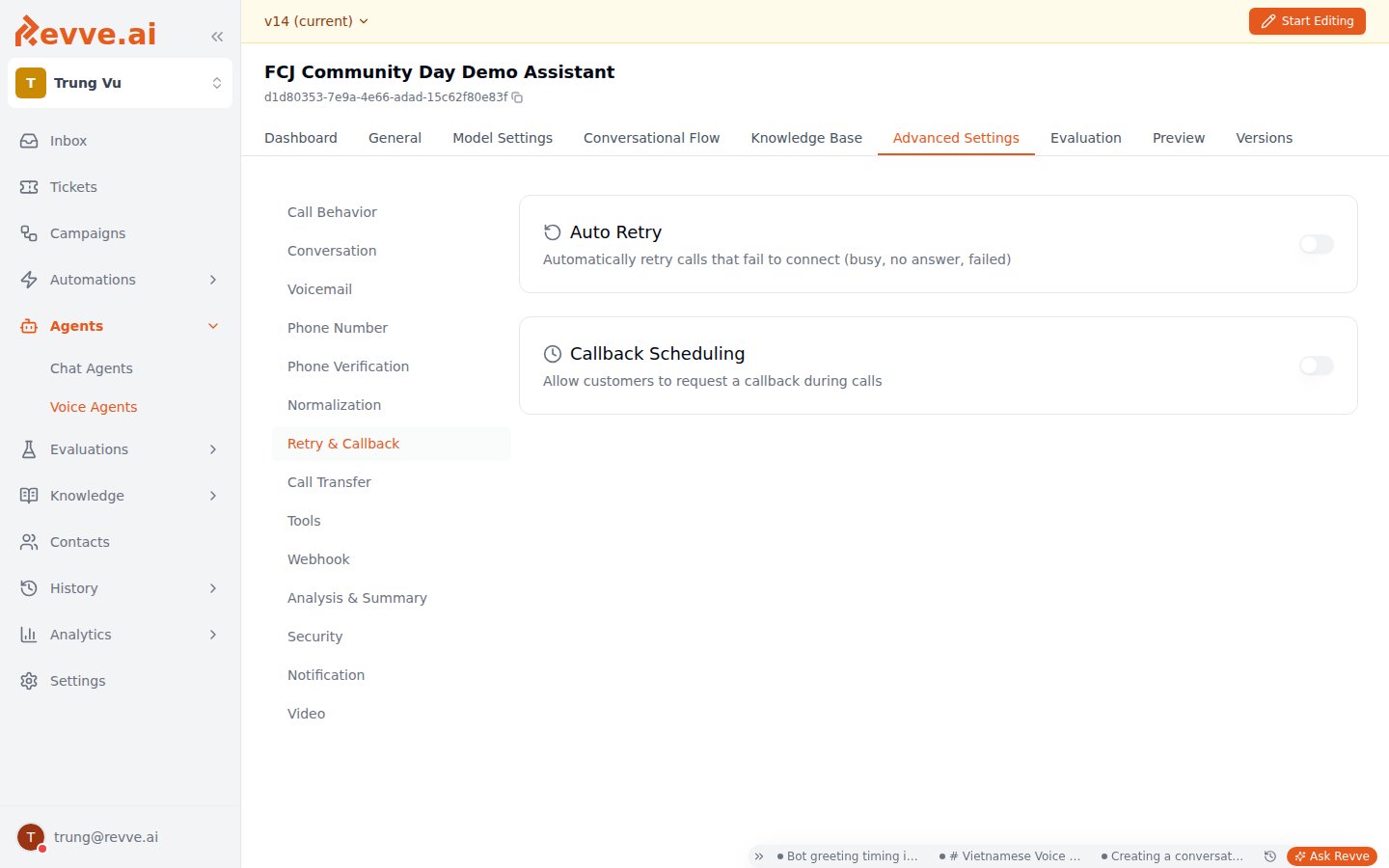 ### Auto Retry
| Setting | Default | When to change |
| ------------------------- | ---------- | ------------------------------------------------------------------------------------------------------------------------------------------------------------------------------------------------------------------------------------------------------------ |
| **Auto Retry** | Off | Turn on for outbound campaigns — a busy signal shouldn't be the end of the story. When on, a new call attempt is scheduled after the wait. It fires on exactly three triggers: the line is busy, the call failed to connect, or the recipient didn't answer. |
| **Retry After (minutes)** | 5 (1–1440) | How long to wait before the retry. 5 minutes suits "line was busy" cases; for no-answers, longer waits (60+ minutes, or hours) give the person a realistic chance of being available the second time. |
### Callback Scheduling
| Setting | Default | When to change |
| ----------------------- | --------- | ----------------------------------------------------------------------------------------------------------------------------------------- |
| **Callback Scheduling** | Off | Turn on to let customers request a callback during the call ("can you call me back this afternoon?") and have it scheduled automatically. |
| **Callback Prompt** | See below | The instructions the AI uses to decide, per call, whether a callback was requested — it evaluates to true/false against your criteria. |
The default prompt:
```text theme={null}
Only True if user explicitly ask for a callback for follow later via call. If only the agent mentions a future callback and user did not explicit agree to it, set this to false. If user scheduled appointments or demos, set this to False. When the call goes to voicemail, set this to false
```
It's deliberately strict — it refuses to schedule callbacks the customer never explicitly agreed to, and excludes voicemails and calls that already ended in a booked appointment. Loosen it with care: a permissive prompt means calling people back who didn't ask for it.
## Webhook
The **Webhook Configuration** card sends real-time updates from your voice agent to your own systems.
### Auto Retry
| Setting | Default | When to change |
| ------------------------- | ---------- | ------------------------------------------------------------------------------------------------------------------------------------------------------------------------------------------------------------------------------------------------------------ |
| **Auto Retry** | Off | Turn on for outbound campaigns — a busy signal shouldn't be the end of the story. When on, a new call attempt is scheduled after the wait. It fires on exactly three triggers: the line is busy, the call failed to connect, or the recipient didn't answer. |
| **Retry After (minutes)** | 5 (1–1440) | How long to wait before the retry. 5 minutes suits "line was busy" cases; for no-answers, longer waits (60+ minutes, or hours) give the person a realistic chance of being available the second time. |
### Callback Scheduling
| Setting | Default | When to change |
| ----------------------- | --------- | ----------------------------------------------------------------------------------------------------------------------------------------- |
| **Callback Scheduling** | Off | Turn on to let customers request a callback during the call ("can you call me back this afternoon?") and have it scheduled automatically. |
| **Callback Prompt** | See below | The instructions the AI uses to decide, per call, whether a callback was requested — it evaluates to true/false against your criteria. |
The default prompt:
```text theme={null}
Only True if user explicitly ask for a callback for follow later via call. If only the agent mentions a future callback and user did not explicit agree to it, set this to false. If user scheduled appointments or demos, set this to False. When the call goes to voicemail, set this to false
```
It's deliberately strict — it refuses to schedule callbacks the customer never explicitly agreed to, and excludes voicemails and calls that already ended in a booked appointment. Loosen it with care: a permissive prompt means calling people back who didn't ask for it.
## Webhook
The **Webhook Configuration** card sends real-time updates from your voice agent to your own systems.
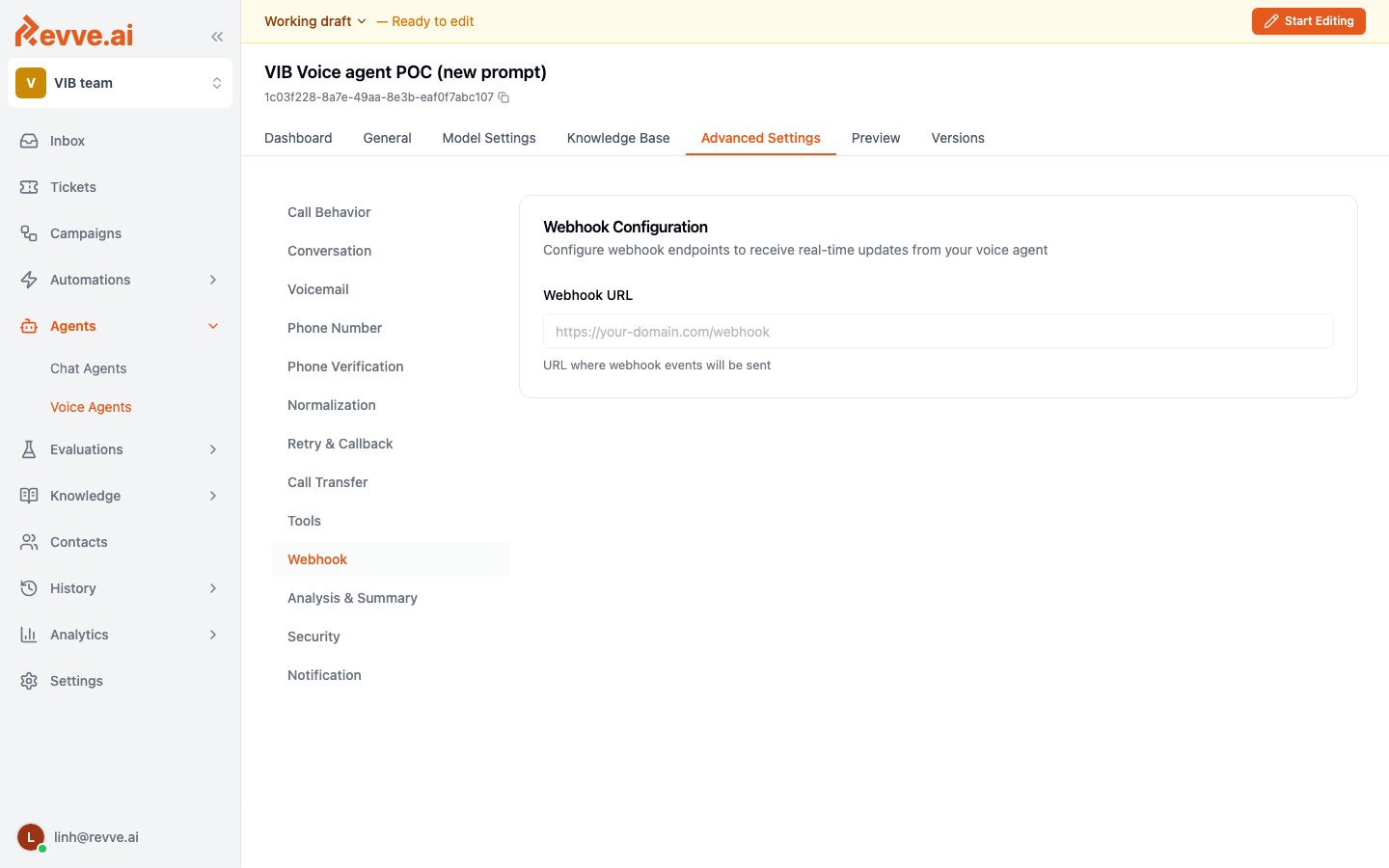 | Setting | Default | When to change |
| --------------- | ------- | ---------------------------------------------------------------------------------------------------------------------------------------------------------------------------------------------------------------------------- |
| **Webhook URL** | Empty | The URL where webhook events are sent (`https://your-domain.com/webhook`). Must be a valid URL; leave it empty if you don't consume events. Set it when your CRM or backend needs to react to call activity without polling. |
There's no per-event selection or signing-secret field — one URL receives the agent's events. If you only need to trigger actions *inside* Revve (tags, assignments, follow-ups), use [automation rules](/docs/automations/automation-rules-overview) instead of standing up an endpoint.
## Analysis & Summary
Controls what Revve extracts from each finished call: the model that does the analysis, the summary written to Call History, and the structured fields pulled from the transcript. Voice agents share this pattern with chat agents — see [Chat Agent Advanced Settings](/docs/general-configuration/chat-agent-advanced-settings) for the chat counterpart.
| Setting | Default | When to change |
| --------------- | ------- | ---------------------------------------------------------------------------------------------------------------------------------------------------------------------------------------------------------------------------- |
| **Webhook URL** | Empty | The URL where webhook events are sent (`https://your-domain.com/webhook`). Must be a valid URL; leave it empty if you don't consume events. Set it when your CRM or backend needs to react to call activity without polling. |
There's no per-event selection or signing-secret field — one URL receives the agent's events. If you only need to trigger actions *inside* Revve (tags, assignments, follow-ups), use [automation rules](/docs/automations/automation-rules-overview) instead of standing up an endpoint.
## Analysis & Summary
Controls what Revve extracts from each finished call: the model that does the analysis, the summary written to Call History, and the structured fields pulled from the transcript. Voice agents share this pattern with chat agents — see [Chat Agent Advanced Settings](/docs/general-configuration/chat-agent-advanced-settings) for the chat counterpart.
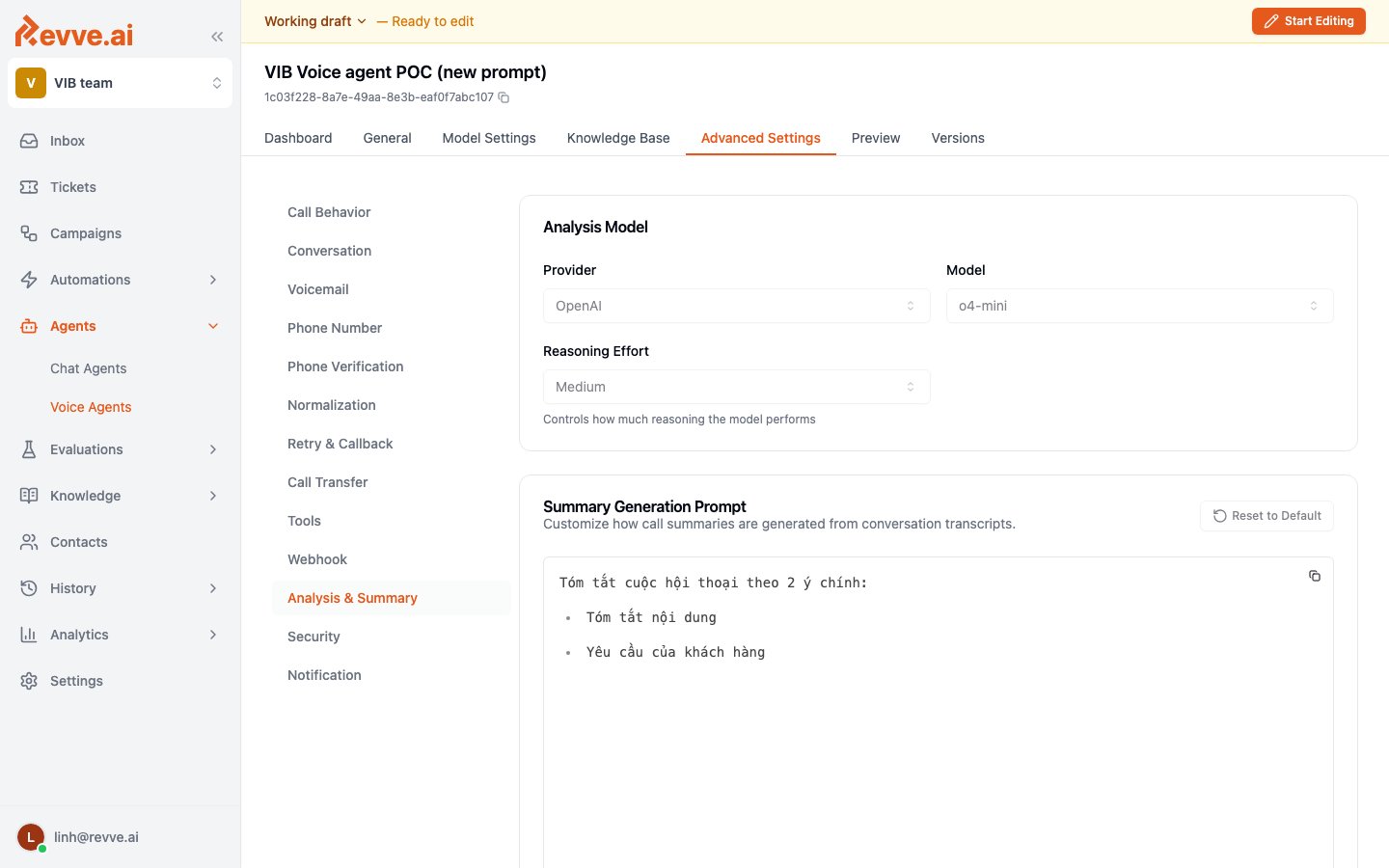 ### Analysis Model
| Setting | Default | When to change |
| -------------------- | ---------------- | ----------------------------------------------------------------------------------------------------------------------------------------------------------------------------------------------------------------------------------------------------------------------------------------------------------- |
| **Provider / Model** | openai / o4-mini | The model that runs summaries and field extraction — it works from the transcript after the call, so its speed never affects the live conversation. Move up a tier if summaries miss nuance or extracted fields come back wrong. See [Choosing an LLM Model](/docs/general-configuration/choosing-an-llm-model). |
| **Reasoning Effort** | — | Shown only for models that support it. |
### Summary Generation Prompt
A rich editor customizing how call summaries are generated from transcripts, with a **Reset to Default** button. The default prompt handles two cases: unconnected or voicemail calls are summarized simply as "Call is not connected."; connected calls produce a structured summary — Brief, Quick Stats, Key Points, and Action Items — translated into the agent's language. Edit it when your team reads summaries for something specific (objections raised, payment promises) that the generic structure buries.
### Call Analysis Fields Configuration
Defines the structured data extracted from every call. Extracted values appear in **Call History** and are available to automations as `payload.call.custom_analysis_data` — this is how a spoken answer ("yes, Thursday works") becomes a field your [automation rules](/docs/automations/automation-rules-overview) can route on.
Click **Add** to define a field:
| Field | Required | What it does |
| ---------------------- | -------- | -------------------------------------------------------------------------------------------------------------------------------------------------------------------------------------------------------------------------------------------------------------------------- |
| **Name** | Yes | The key the value is stored under (e.g. `callbackScheduled`, `appointmentScheduled`). |
| **Type** | Yes | Text, Number, Boolean, or **Address** — Address adds a **Country** select for address parsing. |
| **Description** | Yes | Tells the model what to extract. Be specific — this is the extraction prompt for the field. |
| **Format (Optional)** | No | An output format hint, e.g. `YYYY-MM-DD` for dates. |
| **Extract Separately** | No | Runs a dedicated LLM call to extract this field for better accuracy, with its own model selectors; the field shows a "Separate" badge. Use it for the one or two fields that drive downstream decisions and must be right — each separate extraction is an extra LLM call. |
## Security
The **Security Settings** card holds one toggle:
| Setting | Default | When to change |
| ------------------------------------- | ------- | -------------------------------------------------------------------------------------------------------------------------------------------------------------------------------------------------------------------------------------------------------------------- |
| **Opt Out of Sensitive Data Storage** | Off | Prevents storage of sensitive conversation data. Turn on when your compliance posture requires it — collections, healthcare, financial services. The trade-off: what isn't stored can't be reviewed later, so weigh it against your QA and dispute-resolution needs. |
## Notification
The **Notifications** card alerts your team when specific conditions are met in conversations — a caller asks for a manager, a payment promise is made, a call escalates. You describe the trigger in plain language ("When to trigger notification"), and the AI decides per conversation whether to fire it.
Configuration is the same as the chat agent's Notification panel — trigger description, **Channel** (**Email** or **Slack** — Slack requires the Slack app, and an inline Install Slack card appears if it's not installed), a required **Subject/Title**, then recipients (email addresses) or a Slack Integration + Channel ID. See [Chat Agent Advanced Settings](/docs/general-configuration/chat-agent-advanced-settings) for the field-by-field walkthrough.
One detail worth knowing for voice: email recipients accept template variables like `{{lead_owner_email}}` (validated as chips as you type), so an alert can route to the specific owner of the contact who was on the call rather than a shared inbox.
## What's Next
* [Voice Agent Settings](/docs/voice-agents/voice-agent-settings) — the conversation-shaping tabs this page continues: Call Behavior, Conversation, Voicemail, and Call Transfer.
* [Voice Agent Tools](/docs/voice-agents/voice-agent-tools) — attach custom tools and presets the agent can call mid-conversation.
* [Automation Rules Overview](/docs/automations/automation-rules-overview) — route on the extracted `custom_analysis_data` fields your Analysis configuration produces.
### Analysis Model
| Setting | Default | When to change |
| -------------------- | ---------------- | ----------------------------------------------------------------------------------------------------------------------------------------------------------------------------------------------------------------------------------------------------------------------------------------------------------- |
| **Provider / Model** | openai / o4-mini | The model that runs summaries and field extraction — it works from the transcript after the call, so its speed never affects the live conversation. Move up a tier if summaries miss nuance or extracted fields come back wrong. See [Choosing an LLM Model](/docs/general-configuration/choosing-an-llm-model). |
| **Reasoning Effort** | — | Shown only for models that support it. |
### Summary Generation Prompt
A rich editor customizing how call summaries are generated from transcripts, with a **Reset to Default** button. The default prompt handles two cases: unconnected or voicemail calls are summarized simply as "Call is not connected."; connected calls produce a structured summary — Brief, Quick Stats, Key Points, and Action Items — translated into the agent's language. Edit it when your team reads summaries for something specific (objections raised, payment promises) that the generic structure buries.
### Call Analysis Fields Configuration
Defines the structured data extracted from every call. Extracted values appear in **Call History** and are available to automations as `payload.call.custom_analysis_data` — this is how a spoken answer ("yes, Thursday works") becomes a field your [automation rules](/docs/automations/automation-rules-overview) can route on.
Click **Add** to define a field:
| Field | Required | What it does |
| ---------------------- | -------- | -------------------------------------------------------------------------------------------------------------------------------------------------------------------------------------------------------------------------------------------------------------------------- |
| **Name** | Yes | The key the value is stored under (e.g. `callbackScheduled`, `appointmentScheduled`). |
| **Type** | Yes | Text, Number, Boolean, or **Address** — Address adds a **Country** select for address parsing. |
| **Description** | Yes | Tells the model what to extract. Be specific — this is the extraction prompt for the field. |
| **Format (Optional)** | No | An output format hint, e.g. `YYYY-MM-DD` for dates. |
| **Extract Separately** | No | Runs a dedicated LLM call to extract this field for better accuracy, with its own model selectors; the field shows a "Separate" badge. Use it for the one or two fields that drive downstream decisions and must be right — each separate extraction is an extra LLM call. |
## Security
The **Security Settings** card holds one toggle:
| Setting | Default | When to change |
| ------------------------------------- | ------- | -------------------------------------------------------------------------------------------------------------------------------------------------------------------------------------------------------------------------------------------------------------------- |
| **Opt Out of Sensitive Data Storage** | Off | Prevents storage of sensitive conversation data. Turn on when your compliance posture requires it — collections, healthcare, financial services. The trade-off: what isn't stored can't be reviewed later, so weigh it against your QA and dispute-resolution needs. |
## Notification
The **Notifications** card alerts your team when specific conditions are met in conversations — a caller asks for a manager, a payment promise is made, a call escalates. You describe the trigger in plain language ("When to trigger notification"), and the AI decides per conversation whether to fire it.
Configuration is the same as the chat agent's Notification panel — trigger description, **Channel** (**Email** or **Slack** — Slack requires the Slack app, and an inline Install Slack card appears if it's not installed), a required **Subject/Title**, then recipients (email addresses) or a Slack Integration + Channel ID. See [Chat Agent Advanced Settings](/docs/general-configuration/chat-agent-advanced-settings) for the field-by-field walkthrough.
One detail worth knowing for voice: email recipients accept template variables like `{{lead_owner_email}}` (validated as chips as you type), so an alert can route to the specific owner of the contact who was on the call rather than a shared inbox.
## What's Next
* [Voice Agent Settings](/docs/voice-agents/voice-agent-settings) — the conversation-shaping tabs this page continues: Call Behavior, Conversation, Voicemail, and Call Transfer.
* [Voice Agent Tools](/docs/voice-agents/voice-agent-tools) — attach custom tools and presets the agent can call mid-conversation.
* [Automation Rules Overview](/docs/automations/automation-rules-overview) — route on the extracted `custom_analysis_data` fields your Analysis configuration produces.