> ## Documentation Index
> Fetch the complete documentation index at: https://www.revve.ai/docs/llms.txt
> Use this file to discover all available pages before exploring further.
# Do Not Call List
> A team-wide list of phone numbers your Voice Agents will never call — checked automatically before every outbound call, and populated automatically when a call's analysis flags a do-not-call request.
The **Do Not Call list** (labeled **Block List** in the app) is a team-wide list of phone numbers your Voice Agents refuse to dial. It exists so that honoring an opt-out request — "please don't call me again" — doesn't depend on someone remembering to scrub a contact list before the next Campaign runs. Add a number once, manually or automatically, and every Voice Agent on your team stops calling it: ad-hoc calls, API-triggered calls, and Campaign-driven outbound calls alike.
## How it works
1. **Manage the list manually** at **Settings → General → Block List**. This is a team-level setting — it isn't attached to a single Voice Agent, so a number you block here is blocked for all of them.
2. **Every outbound call is checked automatically before it's placed.** Whether a call is started by hand, through the API, or as a step in a running Campaign, it goes through the same call-initiation path, and that path checks the destination number against the Block List first. A match means the call never goes out.
3. **The list can grow itself.** After a call ends, your agent's post-call analysis — the same mechanism that produces call summaries and extracted data (see [Analysis & Summary](/docs/voice-agents/voice-agent-settings)) — can flag that the caller asked not to be contacted again. When it does, Revve adds that phone number to the Block List automatically. No one has to review the transcript and add it by hand.
## The Block List screen
 | Action | What it does |
| -------------------------- | ------------------------------------------------------------------------------------------------------------------------------------------------------------- |
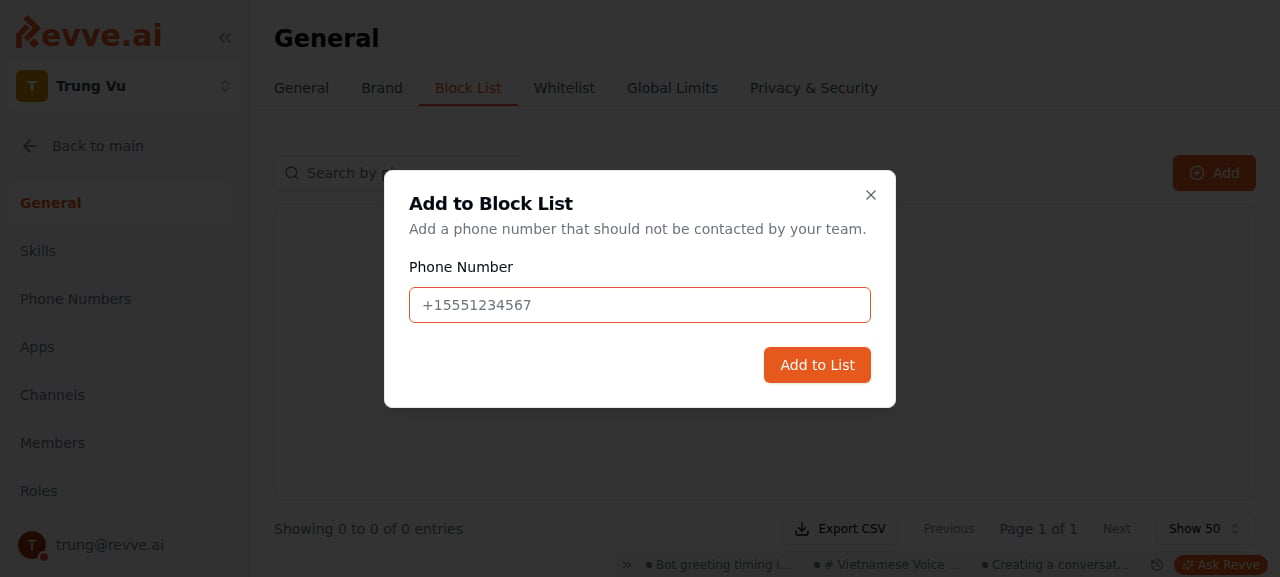
| **+ \[Add]** | Opens an **"Add to Block List"** dialog with a single **Phone Number** field. Accepts digits, spaces, `+`, `-`, and parentheses; requires at least 10 digits. |
| **Search** | Filters the table by phone number or matched contact. |
| **Delete** (per row) | Opens a **"Remove from Block List?"** confirmation before the number is removed. |
| **Export** (download icon) | Downloads the current list. |
Each row shows the **Phone Number**, the **Contact** it matches (name, email, company) if that number belongs to someone in your Contacts, and when it was added. Blocking or unblocking a number also updates the `dnc` flag on the matching Contact record, so the Contacts view stays consistent, and fires a `contact_updated` automation event if you have Automations reacting to contact changes.
## What this means for a Campaign
A Campaign doesn't get its own exemption. If a contact's phone number is on the Block List, the call step the Campaign would otherwise take is skipped — the AI never dials it, and the enrollment moves on exactly as if that call attempt didn't happen, following whatever your Instructions define for that situation (a retry, a channel switch, or an exit). You don't need a separate "check the block list" rule in your Instructions; the suppression happens underneath the Campaign, before your Instructions are ever consulted for that call.
The Block List is a call-suppression mechanism your team controls — it stops your Voice Agents from dialing a number, and it can be updated automatically from what an agent hears on a call. It is not a certified TCPA or other regulatory-compliance product, and Revve makes no compliance guarantee about it. If you operate in a regulated industry, treat this list as one input to your own compliance process — including how you handle opt-out requests that arrive outside a call — not a substitute for it.
## When to add a number yourself
Let the automatic mechanism handle opt-outs stated *during* a call — your agent's analysis catches "don't call me again" in the conversation and blocks the number without any action from you. Add a number manually when the opt-out arrives somewhere your agent never hears it: a reply to an SMS, an email to support, a request made to a human agent, or a number you already know you should never call before you've placed a single call to it. In both cases, the same list is what every future outbound call checks — there's no separate "manual" and "automatic" list to keep in sync.
## What's Next
* [Voice Agent Settings](/docs/voice-agents/voice-agent-settings) — see the **Analysis & Summary** tab for how post-call analysis (and its `do_not_call` flag) is configured.
* [What Is a Campaign?](/docs/campaigns/campaign-overview) — how Campaigns decide what happens next for a contact after a call step is skipped or completed.
| Action | What it does |
| -------------------------- | ------------------------------------------------------------------------------------------------------------------------------------------------------------- |
| **+ \[Add]** | Opens an **"Add to Block List"** dialog with a single **Phone Number** field. Accepts digits, spaces, `+`, `-`, and parentheses; requires at least 10 digits. |
| **Search** | Filters the table by phone number or matched contact. |
| **Delete** (per row) | Opens a **"Remove from Block List?"** confirmation before the number is removed. |
| **Export** (download icon) | Downloads the current list. |
Each row shows the **Phone Number**, the **Contact** it matches (name, email, company) if that number belongs to someone in your Contacts, and when it was added. Blocking or unblocking a number also updates the `dnc` flag on the matching Contact record, so the Contacts view stays consistent, and fires a `contact_updated` automation event if you have Automations reacting to contact changes.
## What this means for a Campaign
A Campaign doesn't get its own exemption. If a contact's phone number is on the Block List, the call step the Campaign would otherwise take is skipped — the AI never dials it, and the enrollment moves on exactly as if that call attempt didn't happen, following whatever your Instructions define for that situation (a retry, a channel switch, or an exit). You don't need a separate "check the block list" rule in your Instructions; the suppression happens underneath the Campaign, before your Instructions are ever consulted for that call.
The Block List is a call-suppression mechanism your team controls — it stops your Voice Agents from dialing a number, and it can be updated automatically from what an agent hears on a call. It is not a certified TCPA or other regulatory-compliance product, and Revve makes no compliance guarantee about it. If you operate in a regulated industry, treat this list as one input to your own compliance process — including how you handle opt-out requests that arrive outside a call — not a substitute for it.
## When to add a number yourself
Let the automatic mechanism handle opt-outs stated *during* a call — your agent's analysis catches "don't call me again" in the conversation and blocks the number without any action from you. Add a number manually when the opt-out arrives somewhere your agent never hears it: a reply to an SMS, an email to support, a request made to a human agent, or a number you already know you should never call before you've placed a single call to it. In both cases, the same list is what every future outbound call checks — there's no separate "manual" and "automatic" list to keep in sync.
## What's Next
* [Voice Agent Settings](/docs/voice-agents/voice-agent-settings) — see the **Analysis & Summary** tab for how post-call analysis (and its `do_not_call` flag) is configured.
* [What Is a Campaign?](/docs/campaigns/campaign-overview) — how Campaigns decide what happens next for a contact after a call step is skipped or completed.