> ## Documentation Index
> Fetch the complete documentation index at: https://www.revve.ai/docs/llms.txt
> Use this file to discover all available pages before exploring further.
# What Is a Chat Agent?
> Learn what Chat Agents are, which channels they support, and what they can do for your business.
A **Chat Agent** is an AI-powered conversational assistant that you create and deploy to interact with your customers across multiple channels. Each Chat Agent is backed by a large language model (LLM) and can be trained on your specific business knowledge to answer questions, qualify leads, schedule meetings, and more — all without human intervention.
## How It Works
When a visitor sends a message — whether through your website widget, WhatsApp, email, or another channel — the Chat Agent:
1. **Receives the message** from the connected channel.
2. **Retrieves relevant context** from your knowledge base (web pages, documents, FAQs).
3. **Generates a response** using the LLM, following the instructions and tone you configured.
4. **Sends the reply** back to the visitor on the same channel.
If the conversation requires a human, the agent can **escalate** to a live team member in your Inbox.
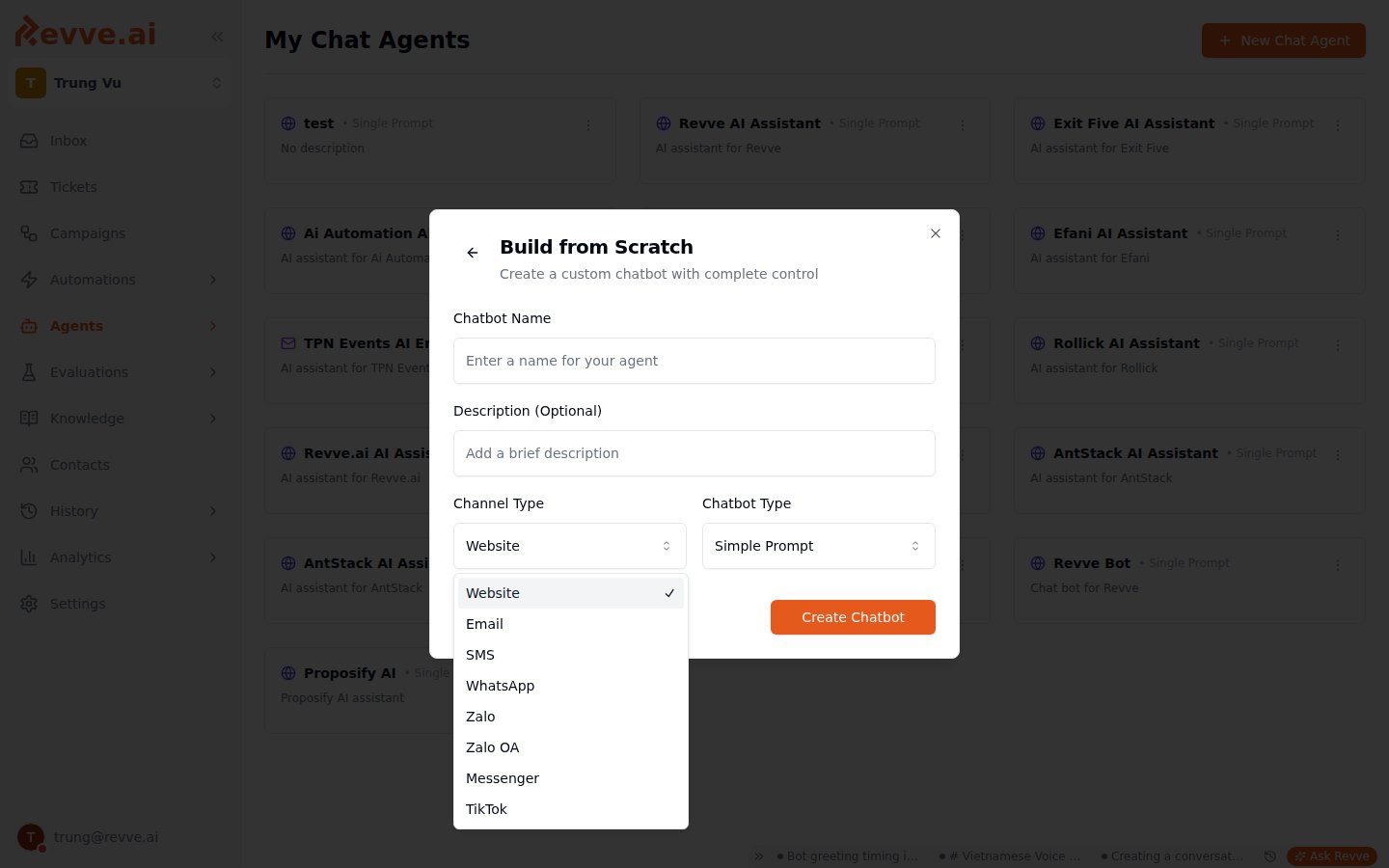
## Supported Channels
Each Chat Agent is configured for a specific channel. You can create multiple agents for different channels.
| Channel | Description |
| ------------- | -------------------------------------------------------------------------------------------------------------------- |
| **Website** | Embedded chat widget on your website. Includes full appearance customization, bubble messages, and visitor tracking. |
| **Email** | Responds to inbound emails via Mailgun or Gmail. Supports thread-based replies and BCC configuration. |
| **SMS** | Handles text message conversations via Twilio. |
| **WhatsApp** | Connects to WhatsApp Business API for automated messaging with template support. |
| **Zalo** | Integrates with Zalo chat. |
| **Zalo OA** | Connects to Zalo Official Account for business messaging. |
| **Messenger** | Responds to Facebook Messenger conversations via your Facebook Page. |
 ## Agent Types (Engine Configuration)
When creating a Chat Agent, you choose one of two engine types:
### Single Prompt (Simple Prompt)
Best for most use cases. You provide a set of **instructions** (objectives) that tell the agent how to behave in all conversations. The agent uses these instructions along with your knowledge base to generate responses.
**Use when:**
* Your conversations follow a general pattern.
* You want a quick setup with natural, flexible responses.
* Your agent handles support, FAQ, or general lead qualification.
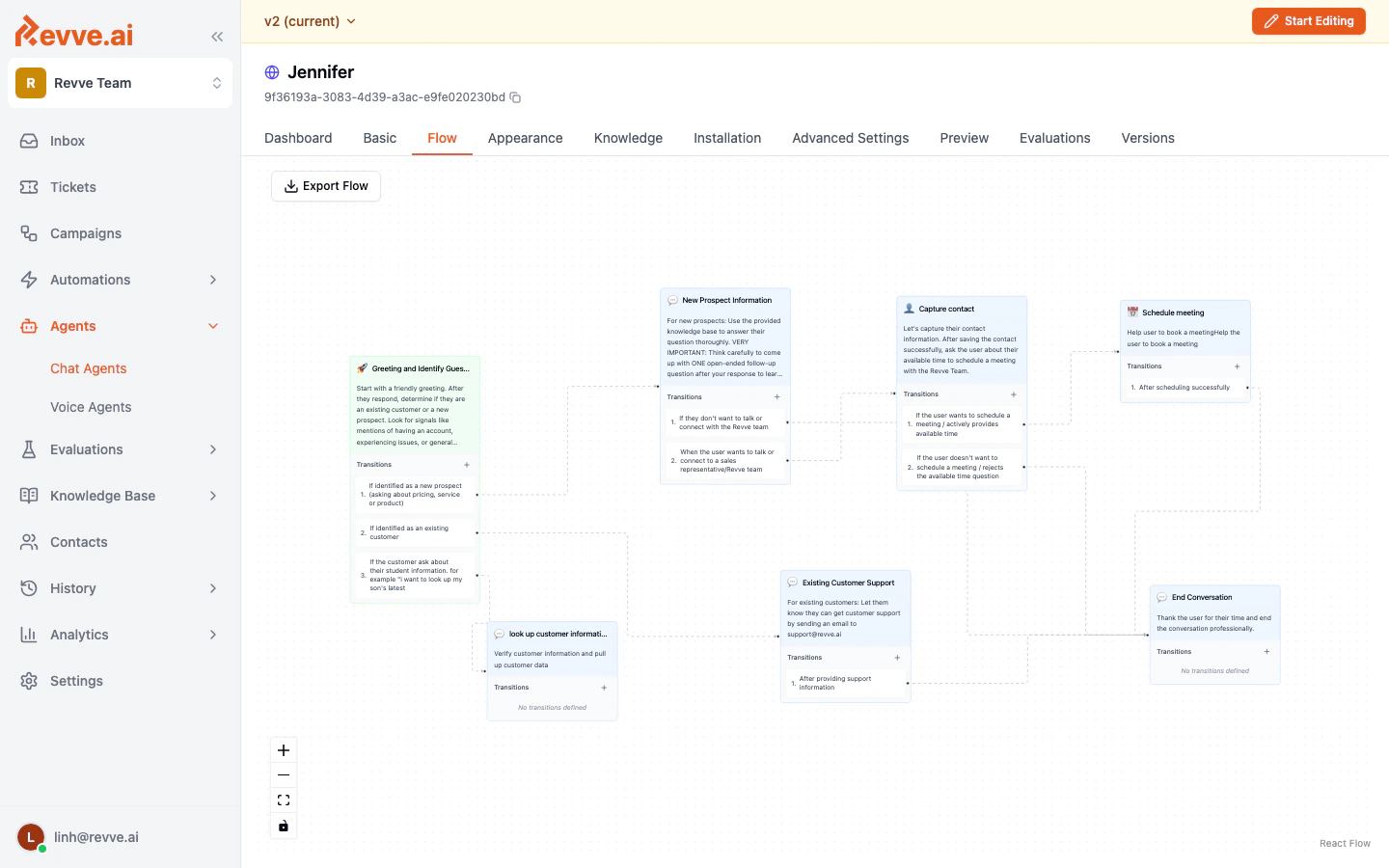
### Conversational Flow
A node-based visual designer where you build a structured conversation tree. Each node represents a stage in the conversation with its own instructions and transition rules.
**Use when:**
* You need a strict, step-by-step conversation path.
* Different branches require completely different behavior.
* You're building a qualification funnel with specific routing logic.
## Agent Types (Engine Configuration)
When creating a Chat Agent, you choose one of two engine types:
### Single Prompt (Simple Prompt)
Best for most use cases. You provide a set of **instructions** (objectives) that tell the agent how to behave in all conversations. The agent uses these instructions along with your knowledge base to generate responses.
**Use when:**
* Your conversations follow a general pattern.
* You want a quick setup with natural, flexible responses.
* Your agent handles support, FAQ, or general lead qualification.
### Conversational Flow
A node-based visual designer where you build a structured conversation tree. Each node represents a stage in the conversation with its own instructions and transition rules.
**Use when:**
* You need a strict, step-by-step conversation path.
* Different branches require completely different behavior.
* You're building a qualification funnel with specific routing logic.
 ## Key Capabilities
Every Chat Agent can be configured with:
* **Knowledge Base** — Upload documents, crawl web pages, and add FAQs so the agent answers from your content.
* **Lead Capture** — Collect contact information (name, email, phone) during conversations.
* **Meeting Scheduling** — Let visitors book meetings directly from the chat.
* **Human Escalation** — Automatically hand off to a live agent when the AI can't handle the request.
* **Tools & Integrations** — Connect to external APIs, CRMs, and trigger custom actions.
* **Message Approval** — Optionally require human approval before the agent sends a message.
* **Analytics** — Track conversation metrics, feedback, and agent performance.
## What's Next
* [Creating Your First Chat Agent](/docs/getting-started/creating-your-first-chat-agent) — Step-by-step guide to get your first agent running.
* [Understanding Engine Types](/docs/getting-started/understanding-engine-types) — Deep dive into Single Prompt vs. Conversational Flow.
* [Publishing & Versioning](/docs/getting-started/publishing-and-versioning) — How to manage drafts, publish changes, and review version history.
## Key Capabilities
Every Chat Agent can be configured with:
* **Knowledge Base** — Upload documents, crawl web pages, and add FAQs so the agent answers from your content.
* **Lead Capture** — Collect contact information (name, email, phone) during conversations.
* **Meeting Scheduling** — Let visitors book meetings directly from the chat.
* **Human Escalation** — Automatically hand off to a live agent when the AI can't handle the request.
* **Tools & Integrations** — Connect to external APIs, CRMs, and trigger custom actions.
* **Message Approval** — Optionally require human approval before the agent sends a message.
* **Analytics** — Track conversation metrics, feedback, and agent performance.
## What's Next
* [Creating Your First Chat Agent](/docs/getting-started/creating-your-first-chat-agent) — Step-by-step guide to get your first agent running.
* [Understanding Engine Types](/docs/getting-started/understanding-engine-types) — Deep dive into Single Prompt vs. Conversational Flow.
* [Publishing & Versioning](/docs/getting-started/publishing-and-versioning) — How to manage drafts, publish changes, and review version history.