> ## Documentation Index
> Fetch the complete documentation index at: https://www.revve.ai/docs/llms.txt
> Use this file to discover all available pages before exploring further.
# Understanding Engine Types
> Compare Single Prompt and Conversational Flow to choose the right engine for your agent.
When creating a Chat Agent, you choose between two engine types: **Single Prompt** and **Conversational Flow**. This guide explains how each works, their differences, and when to use which.
## Single Prompt
Single Prompt is the default and most common engine type. You provide one set of **instructions** (called "Objectives") that the agent follows for every conversation.
### How It Works
1. You write instructions telling the agent its role, goals, and constraints.
2. When a visitor sends a message, the agent combines:
* Your instructions
* The conversation history
* Relevant content from your knowledge base
* Any connected tools
3. The LLM generates a response based on all of this context.
### What You Configure
On the **Basic** tab:
* **Objectives** — The core instructions that guide the agent's behavior.
* **Role** — A description of the agent's persona.
* **AI Model** — Which LLM to use.
* **Language & Tone** — Response language and communication style.
On the **Advanced Settings** tab:
* **Human Escalation** — When to hand off to a human.
* **Contact Collection** — Lead capture form configuration.
* **Schedule Meeting** — Calendar booking integration.
* **Inactivity Follow-up** — Auto-reply when the visitor goes silent.
* **Tools** — External API calls and CRM integrations.
### Best For
* General-purpose support and FAQ agents.
* Lead qualification with flexible conversation paths.
* Agents that need to handle a wide variety of topics.
* Quick setup when you want to get started fast.
### Example Instructions
```
Your goal is to help customers with product questions.
RULES:
- Only reply in English
- Never reveal internal info: API names, error codes, or back-end logic
- If the customer asks about pricing, direct them to revve.ai/pricing
- If you don't know the answer, offer to connect them with a human agent
- Always be friendly and professional
```
***
## Conversational Flow
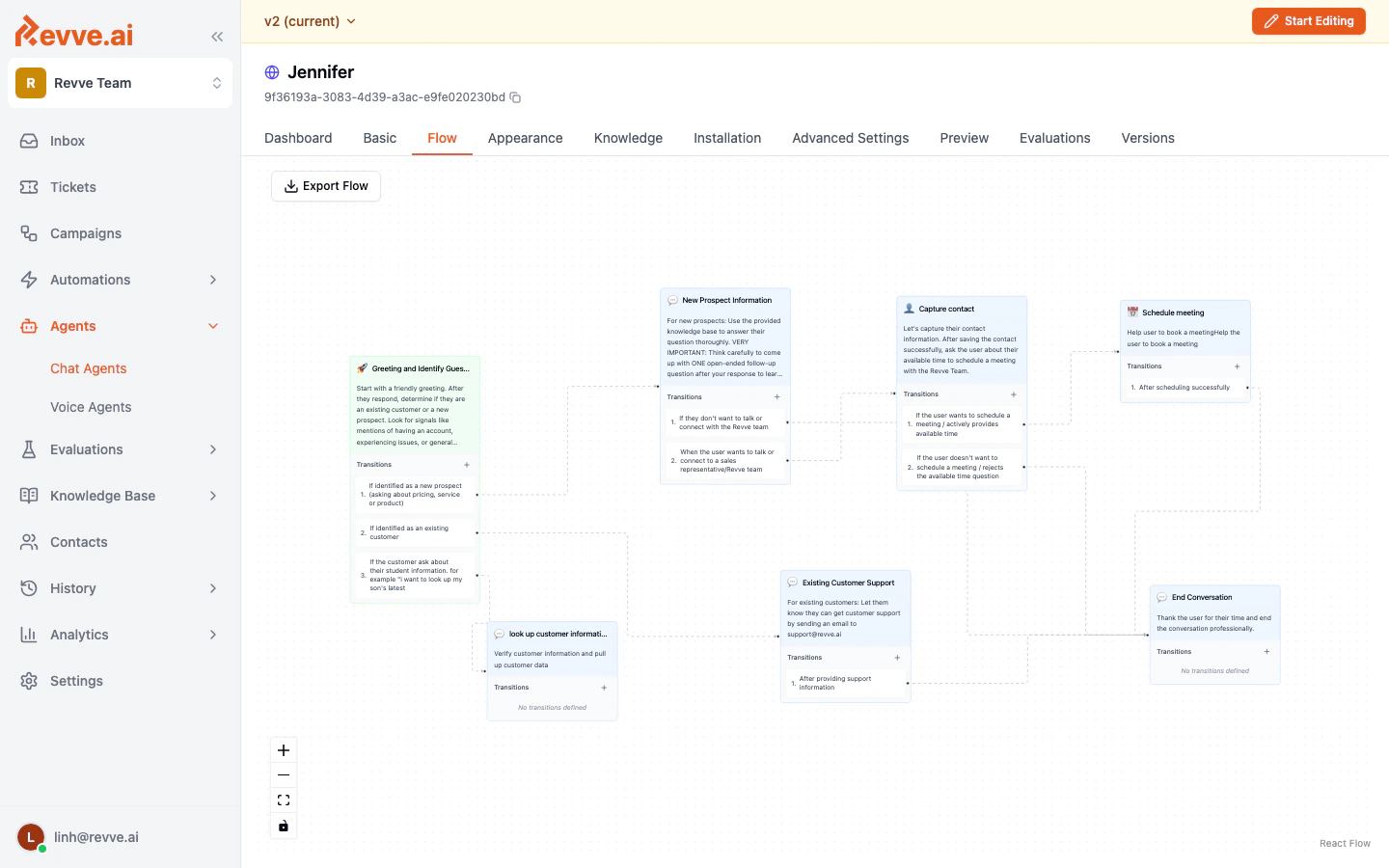
Conversational Flow uses a **visual node-based editor** where you design a structured conversation tree. Each node represents a specific stage in the conversation with its own instructions, transitions, and capabilities.
### How It Works
1. You create **nodes** — each one is a conversation stage (e.g., "Greeting", "Qualification", "Schedule Meeting").
2. You define **edges** (transitions) between nodes with conditions for when to move from one stage to the next.
3. Each node has its own **instructions** that apply only when the conversation is in that stage.
4. The agent follows the flow, transitioning between nodes based on the conversation.
 ### What You Configure
On the **Flow** tab:
* **Nodes** — Create conversation stages with individual instructions.
* **Edges** — Define transitions with conditions (e.g., "when the user provides their email, move to the Qualification node").
* **Global Prompt** — Instructions that apply across all nodes.
* **Start Node** — Which node begins the conversation.
Each node can independently enable:
* Contact collection
* Meeting scheduling
* Human escalation
* Testimonial display
* Custom tools
### Node Types
| Type | Purpose |
| ----------------------- | ---------------------------------------------------------------------------------------------------------------------------------------------------------------------------------------------------------------- |
| **Normal Conversation** | General conversation stage with custom instructions. |
| **Schedule Meeting** | A stage specifically designed to book a meeting. |
| **Contact Collection** | A stage that captures visitor contact information. |
| **Transfer Call** | A telephony hand-off stage (phone number, SIP, or in-app agent). Its configuration targets voice calls — for handing a *chat* to a human, use the Human Escalation toggle on a Normal Conversation node instead. |
### Best For
* Structured qualification funnels (e.g., "What's your budget?" > "What's your timeline?" > "Book a demo").
* Conversations that must follow a strict sequence.
* Different conversation branches that require completely different behavior.
* Complex multi-step workflows where each stage has distinct rules.
***
## Comparison
| Feature | Single Prompt | Conversational Flow |
| ---------------------------- | ------------------------------------------------------------------------------------ | -------------------------------------- |
| **Setup complexity** | Low — write one set of instructions | Medium — design a node graph |
| **Conversation flexibility** | High — agent adapts naturally | Structured — follows defined paths |
| **Configuration tabs** | Basic, Appearance, Knowledge, Installation, Advanced, Preview, Evaluations, Versions | Same + **Flow** tab |
| **Per-stage instructions** | No — one set of instructions for all | Yes — each node has its own |
| **Visual designer** | No | Yes |
| **Contact Collection** | Configured in Advanced Settings | Can be enabled per node |
| **Schedule Meeting** | Configured in Advanced Settings | Can be enabled per node |
| **Best for** | General support, FAQ, flexible conversations | Structured funnels, step-by-step flows |
## Choosing the Right Type
**Start with Single Prompt** if:
* You're setting up your first agent.
* Your conversations don't follow a strict path.
* You want to get started quickly and iterate.
**Use Conversational Flow** if:
* You have a well-defined conversation funnel.
* Different stages require entirely different agent behavior.
* You need granular control over when specific actions (booking, lead capture) happen.
You choose the engine type at creation time. To switch from Single Prompt to Conversational Flow (or vice versa), you'll need to create a new agent.
## What's Next
* [Publishing & Versioning](/docs/getting-started/publishing-and-versioning) — How to publish your agent and manage versions.
### What You Configure
On the **Flow** tab:
* **Nodes** — Create conversation stages with individual instructions.
* **Edges** — Define transitions with conditions (e.g., "when the user provides their email, move to the Qualification node").
* **Global Prompt** — Instructions that apply across all nodes.
* **Start Node** — Which node begins the conversation.
Each node can independently enable:
* Contact collection
* Meeting scheduling
* Human escalation
* Testimonial display
* Custom tools
### Node Types
| Type | Purpose |
| ----------------------- | ---------------------------------------------------------------------------------------------------------------------------------------------------------------------------------------------------------------- |
| **Normal Conversation** | General conversation stage with custom instructions. |
| **Schedule Meeting** | A stage specifically designed to book a meeting. |
| **Contact Collection** | A stage that captures visitor contact information. |
| **Transfer Call** | A telephony hand-off stage (phone number, SIP, or in-app agent). Its configuration targets voice calls — for handing a *chat* to a human, use the Human Escalation toggle on a Normal Conversation node instead. |
### Best For
* Structured qualification funnels (e.g., "What's your budget?" > "What's your timeline?" > "Book a demo").
* Conversations that must follow a strict sequence.
* Different conversation branches that require completely different behavior.
* Complex multi-step workflows where each stage has distinct rules.
***
## Comparison
| Feature | Single Prompt | Conversational Flow |
| ---------------------------- | ------------------------------------------------------------------------------------ | -------------------------------------- |
| **Setup complexity** | Low — write one set of instructions | Medium — design a node graph |
| **Conversation flexibility** | High — agent adapts naturally | Structured — follows defined paths |
| **Configuration tabs** | Basic, Appearance, Knowledge, Installation, Advanced, Preview, Evaluations, Versions | Same + **Flow** tab |
| **Per-stage instructions** | No — one set of instructions for all | Yes — each node has its own |
| **Visual designer** | No | Yes |
| **Contact Collection** | Configured in Advanced Settings | Can be enabled per node |
| **Schedule Meeting** | Configured in Advanced Settings | Can be enabled per node |
| **Best for** | General support, FAQ, flexible conversations | Structured funnels, step-by-step flows |
## Choosing the Right Type
**Start with Single Prompt** if:
* You're setting up your first agent.
* Your conversations don't follow a strict path.
* You want to get started quickly and iterate.
**Use Conversational Flow** if:
* You have a well-defined conversation funnel.
* Different stages require entirely different agent behavior.
* You need granular control over when specific actions (booking, lead capture) happen.
You choose the engine type at creation time. To switch from Single Prompt to Conversational Flow (or vice versa), you'll need to create a new agent.
## What's Next
* [Publishing & Versioning](/docs/getting-started/publishing-and-versioning) — How to publish your agent and manage versions.