> ## Documentation Index
> Fetch the complete documentation index at: https://www.revve.ai/docs/llms.txt
> Use this file to discover all available pages before exploring further.
# Choosing an LLM Model
> Select the model that powers your Chat Agent's responses — and find the other places in Revve where a model choice matters.
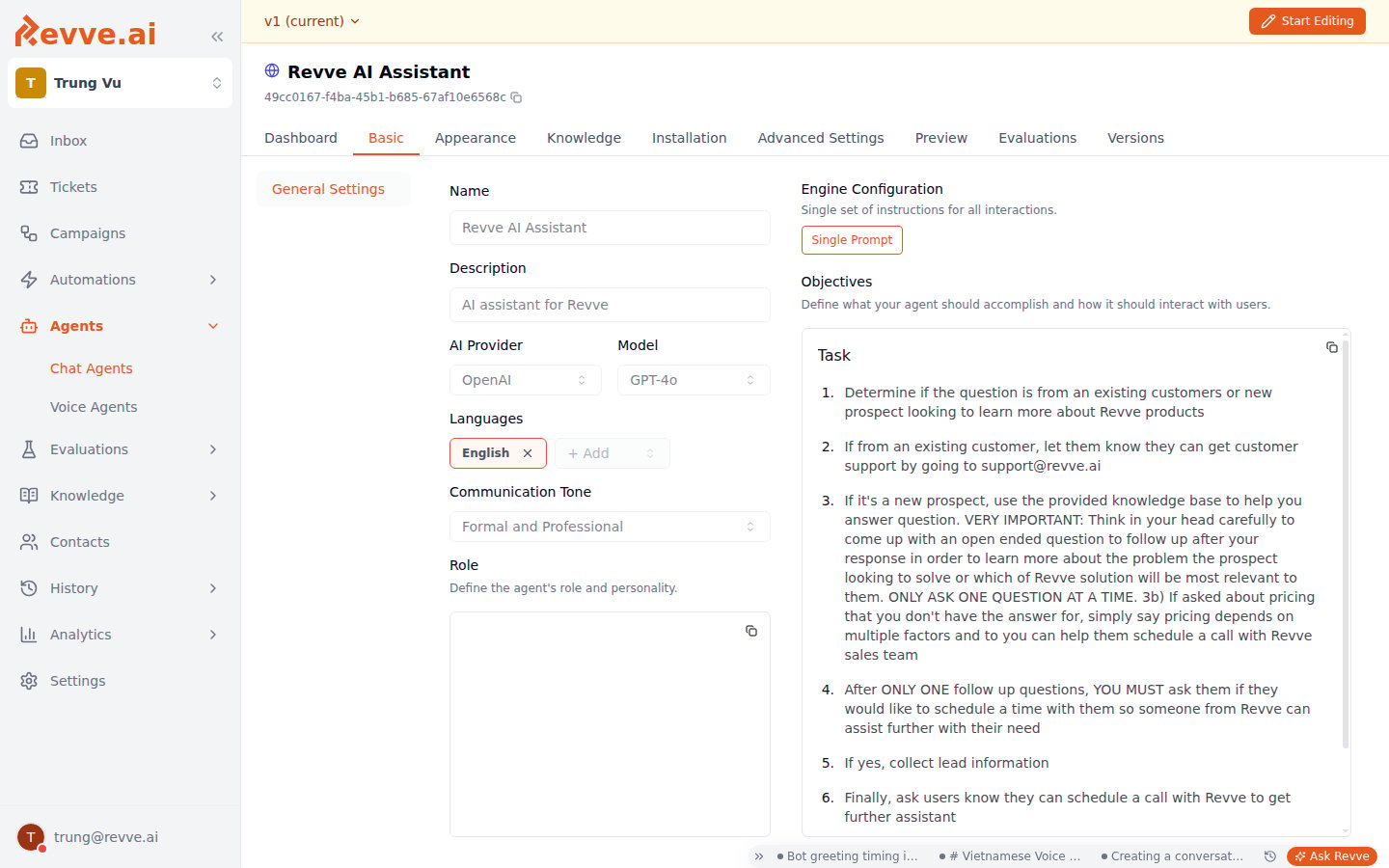
Your Chat Agent's intelligence comes from a large language model (LLM). On the **Basic** tab, you choose which model your agent uses; the choice affects response quality, speed, and how faithfully the agent follows your instructions.
 ## Provider and Model fields
| Field | Description |
| --------------- | --------------------------------------------------------------------------------------------------------------------------------------------------------------------------------------------------- |
| **AI Provider** | Fixed to **OpenAI** for the chat conversational model — the dropdown is shown but not changeable. (Other model pickers in Revve are multi-provider; see [below](#model-choice-elsewhere-in-revve).) |
| **Model** | The specific model that generates responses. Different models trade off quality, speed, and cost. |
The model list currently offers **GPT-4o**, **GPT-4.1**, and **GPT-5**; new agents start on GPT-4.1.
## How to select a model
1. Navigate to **Agents > Chat Agents** in the sidebar and select your agent.
2. Click the **Basic** tab.
3. Click **Start Editing** if not already in edit mode.
4. Click the **Model** dropdown and select your preferred model.
5. Changes save automatically — watch for the **Last saved** indicator in the tab bar.
## How to choose
* **Start with GPT-4.1** for most agents. It's the default for a reason: the best balance of quality, speed, and cost for typical customer-facing conversations.
* **Move up (GPT-5) when the agent mishandles complexity** — technical support, multi-step policies, conversations that need real reasoning. Expect slightly slower responses.
* **Move down (GPT-4o) when speed is the problem** and the conversations are straightforward, FAQ-style exchanges.
* **Test before publishing.** After changing the model, re-test your key scenarios in the **Preview** tab (shown for website and SMS agents) — different models interpret the same instructions slightly differently, so a model change is a behavior change.
## Model choice elsewhere in Revve
The chat conversational model above is the one fixed-provider picker. The other model selectors draw from a central catalog of providers and models that Revve administrators maintain — the dropdowns list whatever is currently enabled, so exact options evolve over time. Today the catalog spans multiple providers, including OpenAI, Anthropic, and Google Gemini.
| Where | What it controls |
| ----------------------------------------------------- | -------------------------------------------------------------------------------------------------------------------------------------------------------------------------------------------------------------------------------------- |
| **Voice Agents → Model Settings → AI Model** | The model powering the voice conversation, with **Provider** and **Model** dropdowns plus **Temperature** (slider 0–2, default 0.7) and **Max Tokens** (default 4096). See [Voice Agent Settings](/docs/voice-agents/voice-agent-settings). |
| **Campaigns → Setup → Provider / Model** | The campaign's decision model — which action to take next for each enrolled contact. See [Creating a Campaign](/docs/campaigns/creating-a-campaign). |
| **Analysis Model** (chat and voice Advanced Settings) | The model that produces the post-conversation summary and extracts your configured analysis fields — separate from the conversational model, so you can analyze with a different model than you converse with. |
Where a selected model supports it, a **Reasoning Effort** selector appears next to the model dropdown with **Low / Medium / High** options (default **Medium**). Higher effort means more thinking before answering — better decisions on complex judgments, at the cost of latency. It's a good fit for campaign decision models, where decisions are infrequent but consequential.
Teams with their own Azure OpenAI capacity can route OpenAI-model traffic to their own Azure deployments via custom endpoints and time-window routing rules, configured in team settings. This changes where requests run, not which models appear in the pickers — ask your Revve contact if you need this.
## What's Next
* [Voice Agent Settings](/docs/voice-agents/voice-agent-settings) — the AI Model section covers the voice-side model, temperature, and max tokens with tuning guidance.
* [Configuring Agent Identity](/docs/general-configuration/configuring-agent-identity) — the name, description, and role that guide whichever model you pick.
## Provider and Model fields
| Field | Description |
| --------------- | --------------------------------------------------------------------------------------------------------------------------------------------------------------------------------------------------- |
| **AI Provider** | Fixed to **OpenAI** for the chat conversational model — the dropdown is shown but not changeable. (Other model pickers in Revve are multi-provider; see [below](#model-choice-elsewhere-in-revve).) |
| **Model** | The specific model that generates responses. Different models trade off quality, speed, and cost. |
The model list currently offers **GPT-4o**, **GPT-4.1**, and **GPT-5**; new agents start on GPT-4.1.
## How to select a model
1. Navigate to **Agents > Chat Agents** in the sidebar and select your agent.
2. Click the **Basic** tab.
3. Click **Start Editing** if not already in edit mode.
4. Click the **Model** dropdown and select your preferred model.
5. Changes save automatically — watch for the **Last saved** indicator in the tab bar.
## How to choose
* **Start with GPT-4.1** for most agents. It's the default for a reason: the best balance of quality, speed, and cost for typical customer-facing conversations.
* **Move up (GPT-5) when the agent mishandles complexity** — technical support, multi-step policies, conversations that need real reasoning. Expect slightly slower responses.
* **Move down (GPT-4o) when speed is the problem** and the conversations are straightforward, FAQ-style exchanges.
* **Test before publishing.** After changing the model, re-test your key scenarios in the **Preview** tab (shown for website and SMS agents) — different models interpret the same instructions slightly differently, so a model change is a behavior change.
## Model choice elsewhere in Revve
The chat conversational model above is the one fixed-provider picker. The other model selectors draw from a central catalog of providers and models that Revve administrators maintain — the dropdowns list whatever is currently enabled, so exact options evolve over time. Today the catalog spans multiple providers, including OpenAI, Anthropic, and Google Gemini.
| Where | What it controls |
| ----------------------------------------------------- | -------------------------------------------------------------------------------------------------------------------------------------------------------------------------------------------------------------------------------------- |
| **Voice Agents → Model Settings → AI Model** | The model powering the voice conversation, with **Provider** and **Model** dropdowns plus **Temperature** (slider 0–2, default 0.7) and **Max Tokens** (default 4096). See [Voice Agent Settings](/docs/voice-agents/voice-agent-settings). |
| **Campaigns → Setup → Provider / Model** | The campaign's decision model — which action to take next for each enrolled contact. See [Creating a Campaign](/docs/campaigns/creating-a-campaign). |
| **Analysis Model** (chat and voice Advanced Settings) | The model that produces the post-conversation summary and extracts your configured analysis fields — separate from the conversational model, so you can analyze with a different model than you converse with. |
Where a selected model supports it, a **Reasoning Effort** selector appears next to the model dropdown with **Low / Medium / High** options (default **Medium**). Higher effort means more thinking before answering — better decisions on complex judgments, at the cost of latency. It's a good fit for campaign decision models, where decisions are infrequent but consequential.
Teams with their own Azure OpenAI capacity can route OpenAI-model traffic to their own Azure deployments via custom endpoints and time-window routing rules, configured in team settings. This changes where requests run, not which models appear in the pickers — ask your Revve contact if you need this.
## What's Next
* [Voice Agent Settings](/docs/voice-agents/voice-agent-settings) — the AI Model section covers the voice-side model, temperature, and max tokens with tuning guidance.
* [Configuring Agent Identity](/docs/general-configuration/configuring-agent-identity) — the name, description, and role that guide whichever model you pick.