> ## Documentation Index
> Fetch the complete documentation index at: https://www.revve.ai/docs/llms.txt
> Use this file to discover all available pages before exploring further.
# Evaluation Metrics
> The team-wide library of reusable scoring criteria — deterministic checks and LLM-judged rubrics — shared by Evaluators, Scorecards, and the per-Voice-Agent Evaluation tab.
**Metrics** (**Evaluations → Metrics** in the left dashboard nav) is a standalone library where a team defines reusable scoring criteria once and attaches them wherever calls or conversations get graded. It's the same system already introduced in [Voice Agent Evaluation](/docs/voice-agents/voice-agent-evaluation): metrics belong to your team, not to a single agent, so a metric you build here is the same metric you can add to a Voice Agent's **Evaluation** tab, an Evaluator, or a Scorecard. This page covers the library UI itself — where you create, edit, and delete metrics. For how a metric is scored (Deterministic vs. LLM Judge, the seven deterministic checks, Binary vs. Scale 1-5, speaker scope, score rubrics), see [Voice Agent Evaluation — Metric types](/docs/voice-agents/voice-agent-evaluation#metric-types); that mechanics doesn't change based on where the metric is used.
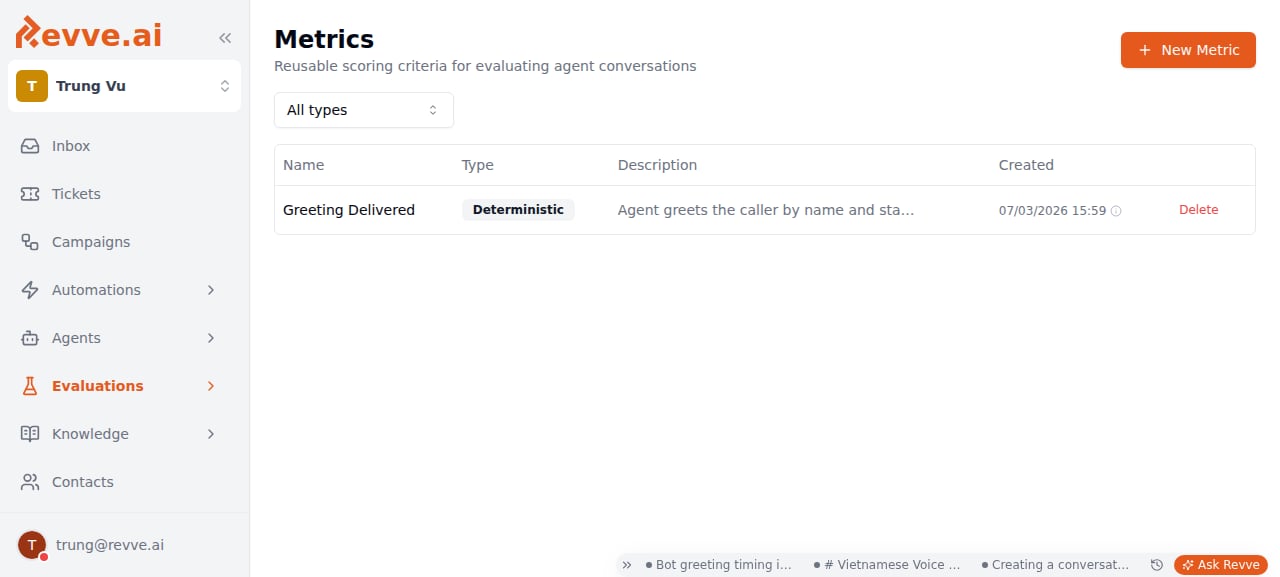 One team-wide library, several consumers. A metric created here can be attached to:
* The per-Voice-Agent **Evaluation** tab — see [Voice Agent Evaluation](/docs/voice-agents/voice-agent-evaluation).
* An **Evaluator**, in the top-level Evaluations product — see [Creating an Evaluator](/docs/evaluations/creating-an-evaluator).
* A **Scorecard**, for grading uploaded call recordings — see [Evaluations Overview](/docs/evaluations/evaluations-overview).
Editing a metric here changes it everywhere it's attached — there's no per-consumer override of a metric's own definition, only of its weight and threshold within each policy.
## Creating a metric
Click **New Metric** (top right, also shown in the empty state) to open a side panel titled **New Metric**. Editing an existing metric — click its row — opens the same panel titled **Edit Metric**.
| Field | Notes |
| --------------- | --------------------------------------------------------------------------------------------------------------------------------------------------------------------------------------------- |
| **Name** | Required. Placeholder example: "e.g. Verified Identity". Keep it specific enough to recognize in a weighted-metrics table on an agent or Scorecard, where you won't see the full description. |
| **Description** | Optional. Placeholder: "What this metric checks...". Worth filling in — it's the only context a teammate attaching your metric to their own agent sees before they add it. |
| **Type** | Required. **Deterministic** or **LLM Judge**. See [Metric types](/docs/voice-agents/voice-agent-evaluation#metric-types) for the difference. |
**When Type is Deterministic:**
| Field | Notes |
| -------------- | ------------------------------------------------------------------------------------------------------------------------------------------------------------------------------------------------------------------------------------------------------------------------------- |
| **Check Type** | Defaults to **Tool Called**. The same seven deterministic checks documented in [Voice Agent Evaluation](/docs/voice-agents/voice-agent-evaluation#deterministic-checks) — Tool Called, Tool Not Called, Tool Called With, Contains Text, Not Contains Text, Regex Match, Turn Count. |
**When Type is LLM Judge:**
| Field | Notes |
| ---------------------------------------------------------- | ----------------------------------------------------------------------------------------------------------------------------------------------------------------------------------------------------------------------------------------------------------------------------------------------------------------------------------------------------------------------------------------------------------------- |
| **Scoring** | Radio: **Binary (pass/fail)** ("Judge returns true or false. Default.") or **Scale 1-5** ("Judge assigns a score (1-5) using your rubric. Default pass threshold is 4."). Binary is enough for a yes/no policy check; reach for Scale 1-5 when you actually want a numeric trend to watch over time — it costs you five rubric fields up front, but a metric that's always going to be pass/fail doesn't need it. |
| **Judge Prompt** | The grading instruction sent to the LLM alongside the transcript. Placeholder example in the app: "Did the agent verify the customer's identity before providing account information?" Write it as a specific yes/no or gradable question, not a vague theme like "was the agent helpful". |
| **Who is being evaluated?** | Radio: **AI Agent** ("Score the agent's utterances. The caller's lines stay as context.") or **Caller** ("Score the caller's utterances. The agent's lines stay as context."). |
| **Score rubric — what merits each score for this metric?** | Only shown when Scoring is Scale 1-5. Five fields, **Score 1** through **Score 5**, each with placeholder "What in the conversation would warrant this score?". Fill in every level, not just the ends — a judge with no definition for "3" will assign one anyway, just inconsistently. |
Submit with the button at the bottom of the panel: **Create** for a new metric, **Save Changes** when editing.
Use the **Type** filter above the table (**All types** / **Deterministic** / **LLM Judge**) to check for near-duplicates before creating a new metric — it's easy to end up with two similarly-named LLM Judge metrics asking almost the same question, which just doubles judge cost without adding signal.
## Where metrics get used
| Consumer | What it's for | Docs |
| ------------------------------ | ----------------------------------------------------------------------------------------------------------------------------------------- | -------------------------------------------------------------- |
| Voice Agent **Evaluation** tab | Automatic post-call grading of every completed call for one agent, split into Caller/Agent groups with weights and a minimum pass score. | [Voice Agent Evaluation](/docs/voice-agents/voice-agent-evaluation) |
| **Evaluators** | Pre-ship regression testing — grade a simulated or scripted test conversation before you publish an agent change. | [Creating an Evaluator](/docs/evaluations/creating-an-evaluator) |
| **Scorecards** | Grade batches of already-recorded calls uploaded from Call History, using the same weighted-metrics UI as the Voice Agent Evaluation tab. | [Evaluations Overview](/docs/evaluations/evaluations-overview) |
## Deleting a metric
The row-level delete action opens an **AlertDialog** titled **Delete metric**:
> This metric will be removed from all evaluators that use it. This action cannot be undone.
Read that literally and it undersells the blast radius: the confirmation copy only mentions evaluators, but the same metric may also be attached to a Voice Agent's Evaluation policy or a Scorecard. Deletion isn't scoped to one consumer — if you're not certain a metric is unused, check its usage on Voice Agents and Scorecards before deleting it, not just in the Evaluators list. There's no undo.
## What's Next
* [Voice Agent Evaluation](/docs/voice-agents/voice-agent-evaluation) — the metric type system in full: deterministic checks, LLM Judge scoring, speaker scope, and how a group's final score is calculated.
* [Evaluations Overview](/docs/evaluations/evaluations-overview) — how Evaluators, Profiles, Metrics, Scorecards, and Runs fit together.
* [Creating an Evaluator](/docs/evaluations/creating-an-evaluator) — build a pre-ship test case and attach metrics from this library to it.
One team-wide library, several consumers. A metric created here can be attached to:
* The per-Voice-Agent **Evaluation** tab — see [Voice Agent Evaluation](/docs/voice-agents/voice-agent-evaluation).
* An **Evaluator**, in the top-level Evaluations product — see [Creating an Evaluator](/docs/evaluations/creating-an-evaluator).
* A **Scorecard**, for grading uploaded call recordings — see [Evaluations Overview](/docs/evaluations/evaluations-overview).
Editing a metric here changes it everywhere it's attached — there's no per-consumer override of a metric's own definition, only of its weight and threshold within each policy.
## Creating a metric
Click **New Metric** (top right, also shown in the empty state) to open a side panel titled **New Metric**. Editing an existing metric — click its row — opens the same panel titled **Edit Metric**.
| Field | Notes |
| --------------- | --------------------------------------------------------------------------------------------------------------------------------------------------------------------------------------------- |
| **Name** | Required. Placeholder example: "e.g. Verified Identity". Keep it specific enough to recognize in a weighted-metrics table on an agent or Scorecard, where you won't see the full description. |
| **Description** | Optional. Placeholder: "What this metric checks...". Worth filling in — it's the only context a teammate attaching your metric to their own agent sees before they add it. |
| **Type** | Required. **Deterministic** or **LLM Judge**. See [Metric types](/docs/voice-agents/voice-agent-evaluation#metric-types) for the difference. |
**When Type is Deterministic:**
| Field | Notes |
| -------------- | ------------------------------------------------------------------------------------------------------------------------------------------------------------------------------------------------------------------------------------------------------------------------------- |
| **Check Type** | Defaults to **Tool Called**. The same seven deterministic checks documented in [Voice Agent Evaluation](/docs/voice-agents/voice-agent-evaluation#deterministic-checks) — Tool Called, Tool Not Called, Tool Called With, Contains Text, Not Contains Text, Regex Match, Turn Count. |
**When Type is LLM Judge:**
| Field | Notes |
| ---------------------------------------------------------- | ----------------------------------------------------------------------------------------------------------------------------------------------------------------------------------------------------------------------------------------------------------------------------------------------------------------------------------------------------------------------------------------------------------------- |
| **Scoring** | Radio: **Binary (pass/fail)** ("Judge returns true or false. Default.") or **Scale 1-5** ("Judge assigns a score (1-5) using your rubric. Default pass threshold is 4."). Binary is enough for a yes/no policy check; reach for Scale 1-5 when you actually want a numeric trend to watch over time — it costs you five rubric fields up front, but a metric that's always going to be pass/fail doesn't need it. |
| **Judge Prompt** | The grading instruction sent to the LLM alongside the transcript. Placeholder example in the app: "Did the agent verify the customer's identity before providing account information?" Write it as a specific yes/no or gradable question, not a vague theme like "was the agent helpful". |
| **Who is being evaluated?** | Radio: **AI Agent** ("Score the agent's utterances. The caller's lines stay as context.") or **Caller** ("Score the caller's utterances. The agent's lines stay as context."). |
| **Score rubric — what merits each score for this metric?** | Only shown when Scoring is Scale 1-5. Five fields, **Score 1** through **Score 5**, each with placeholder "What in the conversation would warrant this score?". Fill in every level, not just the ends — a judge with no definition for "3" will assign one anyway, just inconsistently. |
Submit with the button at the bottom of the panel: **Create** for a new metric, **Save Changes** when editing.
Use the **Type** filter above the table (**All types** / **Deterministic** / **LLM Judge**) to check for near-duplicates before creating a new metric — it's easy to end up with two similarly-named LLM Judge metrics asking almost the same question, which just doubles judge cost without adding signal.
## Where metrics get used
| Consumer | What it's for | Docs |
| ------------------------------ | ----------------------------------------------------------------------------------------------------------------------------------------- | -------------------------------------------------------------- |
| Voice Agent **Evaluation** tab | Automatic post-call grading of every completed call for one agent, split into Caller/Agent groups with weights and a minimum pass score. | [Voice Agent Evaluation](/docs/voice-agents/voice-agent-evaluation) |
| **Evaluators** | Pre-ship regression testing — grade a simulated or scripted test conversation before you publish an agent change. | [Creating an Evaluator](/docs/evaluations/creating-an-evaluator) |
| **Scorecards** | Grade batches of already-recorded calls uploaded from Call History, using the same weighted-metrics UI as the Voice Agent Evaluation tab. | [Evaluations Overview](/docs/evaluations/evaluations-overview) |
## Deleting a metric
The row-level delete action opens an **AlertDialog** titled **Delete metric**:
> This metric will be removed from all evaluators that use it. This action cannot be undone.
Read that literally and it undersells the blast radius: the confirmation copy only mentions evaluators, but the same metric may also be attached to a Voice Agent's Evaluation policy or a Scorecard. Deletion isn't scoped to one consumer — if you're not certain a metric is unused, check its usage on Voice Agents and Scorecards before deleting it, not just in the Evaluators list. There's no undo.
## What's Next
* [Voice Agent Evaluation](/docs/voice-agents/voice-agent-evaluation) — the metric type system in full: deterministic checks, LLM Judge scoring, speaker scope, and how a group's final score is calculated.
* [Evaluations Overview](/docs/evaluations/evaluations-overview) — how Evaluators, Profiles, Metrics, Scorecards, and Runs fit together.
* [Creating an Evaluator](/docs/evaluations/creating-an-evaluator) — build a pre-ship test case and attach metrics from this library to it.