> ## Documentation Index
> Fetch the complete documentation index at: https://www.revve.ai/docs/llms.txt
> Use this file to discover all available pages before exploring further.
# Skills for Ask Revve
> How team members who use the Ask Revve copilot write, scope, and share skills — reusable markdown instructions that make the copilot follow the same playbook every time.
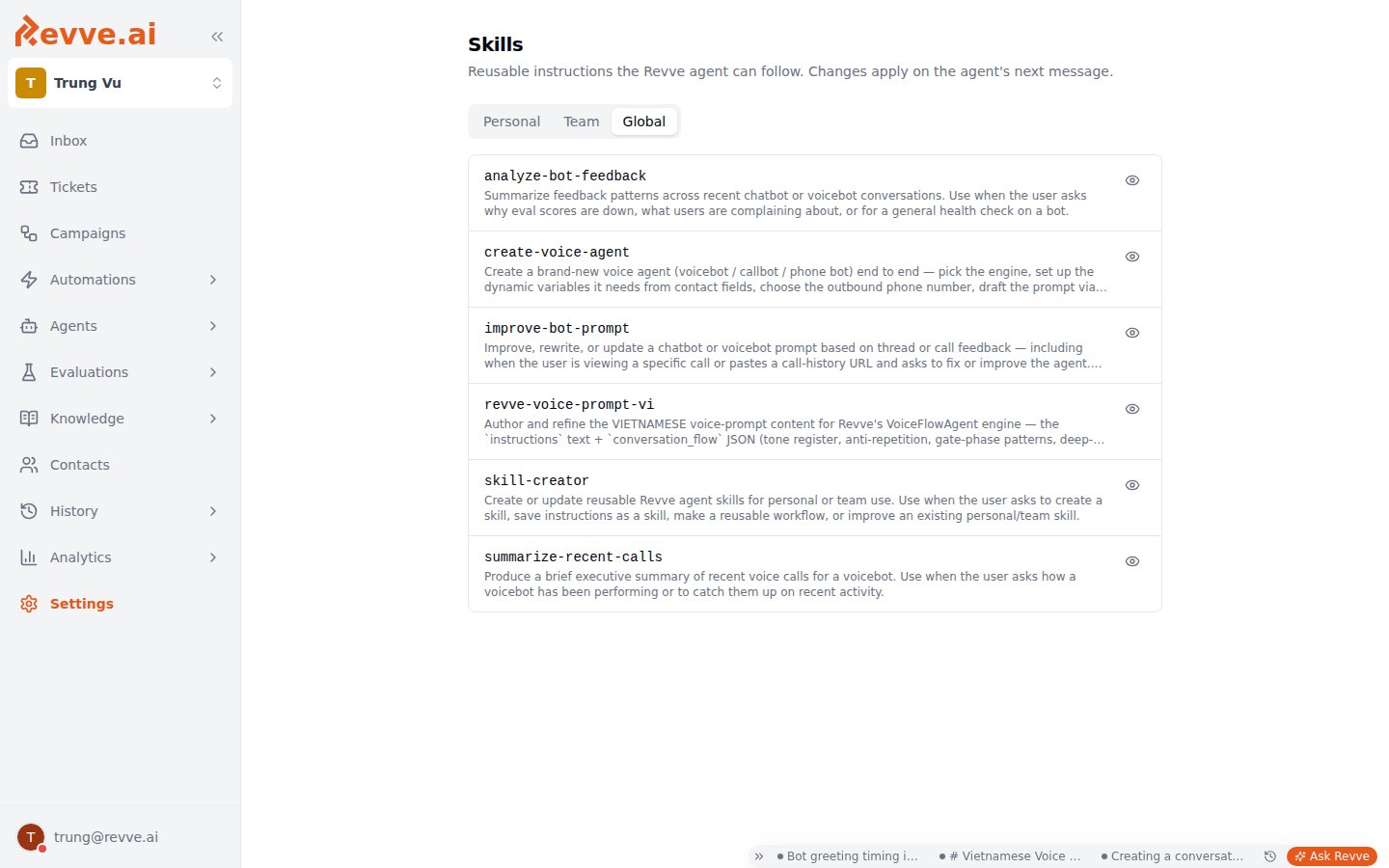
A **skill** is a named markdown instruction module that [Ask Revve](/docs/ask-revve/ask-revve-overview) — the in-app copilot — loads to follow multi-step workflows consistently. The Skills page describes them as "Reusable instructions the Revve agent can follow. Changes apply on the agent's next message."
One thing to get straight before anything else: **skills steer the copilot, not your customers' agents**. A skill changes how Ask Revve behaves when *you* chat with it inside the dashboard. It is never attached to your customer-facing chat or voice agents — their behavior lives in their prompts and conversation flows.
The Skills page appears under **Settings → Skills** for members with the Manage Settings permission; everyone else reaches it through the **Manage skills** link next to the composer's **Skill** button.
 ## Scopes
Skills live in three tabs, each with its own ownership and permission model:
| Scope | Who sees it | Who can create/edit/delete |
| ------------ | ----------------------------- | ----------------------------------------------------------------------------------------------------------- |
| **Personal** | Only you | You |
| **Team** | Every member of the workspace | Anyone with the **Manage Settings** permission — others see the tab read-only, with no **New skill** button |
| **Global** | Everyone | No one — built in by Revve, read-only |
Global skills are the copilot's stock playbooks. The ones that ship include `analyze-bot-feedback`, `create-voice-agent`, `improve-bot-prompt`, `revve-voice-prompt-vi`, `summarize-recent-calls`, and `skill-creator`.
Start in **Personal** while a workflow is still yours to refine; promote it to **Team** once it's stable and you want every teammate's copilot following the same procedure. Team scope is the point of the feature — it turns individual habits into shared process. See [Roles & Permissions](/docs/governance-access/roles-and-permissions) for how **Manage Settings** is granted.
## Creating a skill
Click **New skill** (on the **Personal** tab, or on **Team** if you hold **Manage Settings**). The dialog has three fields:
| Field | What to enter |
| ---------------- | -------------------------------------------------------------------------------------------------------------------------------------------------------------------------------------------------------------------------- |
| **Name** | kebab-case — lowercase letters, digits, and hyphens, max 64 characters. Example: `improve-bot-prompt`. |
| **Description** | One line: what this skill does *and when to use it*. This is how the copilot decides whether the skill applies to a message, so make it sharp — "Weekly review of negative-feedback calls" beats "Call stuff". |
| **Instructions** | The playbook itself, in markdown, with an **Edit**/**Preview** toggle. The placeholder suggests structuring it as `# When to use…` followed by `## Workflow` — a good default: state the trigger, then the numbered steps. |
Click **Create skill** to save (or **Save changes** when editing an existing one). Deleting asks you to confirm with `Delete skill "{name}"?`.
There is no versioning. Edits take effect on the copilot's next message — so if a team skill misfires mid-rollout, fixing the instructions fixes it immediately for everyone.
## How skills get used
Three ways, from least to most deliberate:
1. **Automatic loading.** Ask Revve loads Global + Team + your Personal skills on every conversation and picks whichever fits the message. This is why the description matters: it's the matching surface.
2. **Forcing a skill.** The **Skill** button (book icon) in the composer lets you invoke a specific skill for a message — useful when you want a particular playbook regardless of how you phrase the request.
3. **Asking the copilot to write one.** Tell Ask Revve to "save this workflow as a skill" after a session that went well — the built-in `skill-creator` skill guides it through drafting the name, description, and instructions. Saving to Team scope this way still requires **Manage Settings**.
## What makes a good skill
Good skills encode *your* playbooks — the procedures that live in someone's head or a forgotten wiki page:
* **A weekly call-review routine** — which metrics to pull, what counts as a red flag, how to summarize findings.
* **Your team's prompt style guide** — so every "improve this prompt" request applies the same voice and structure rules.
* **A campaign-launch checklist** — the checks to run before a campaign draft goes to review.
The payoff is consistency: once these are Team skills, every teammate's copilot follows the same procedure, not their own improvisation.
Write instructions the way you'd brief a new teammate: state when the workflow applies, then the steps in order, then what "done" looks like. Vague instructions produce vague behavior — the copilot follows what you wrote, not what you meant.
## What's Next
* [Ask Revve Overview](/docs/ask-revve/ask-revve-overview) — what the copilot is, what it sees, and how its proposal-and-apply flow keeps humans in charge of publishing.
* [Roles & Permissions](/docs/governance-access/roles-and-permissions) — the **Manage Settings** permission that gates Team-scope skills.
## Scopes
Skills live in three tabs, each with its own ownership and permission model:
| Scope | Who sees it | Who can create/edit/delete |
| ------------ | ----------------------------- | ----------------------------------------------------------------------------------------------------------- |
| **Personal** | Only you | You |
| **Team** | Every member of the workspace | Anyone with the **Manage Settings** permission — others see the tab read-only, with no **New skill** button |
| **Global** | Everyone | No one — built in by Revve, read-only |
Global skills are the copilot's stock playbooks. The ones that ship include `analyze-bot-feedback`, `create-voice-agent`, `improve-bot-prompt`, `revve-voice-prompt-vi`, `summarize-recent-calls`, and `skill-creator`.
Start in **Personal** while a workflow is still yours to refine; promote it to **Team** once it's stable and you want every teammate's copilot following the same procedure. Team scope is the point of the feature — it turns individual habits into shared process. See [Roles & Permissions](/docs/governance-access/roles-and-permissions) for how **Manage Settings** is granted.
## Creating a skill
Click **New skill** (on the **Personal** tab, or on **Team** if you hold **Manage Settings**). The dialog has three fields:
| Field | What to enter |
| ---------------- | -------------------------------------------------------------------------------------------------------------------------------------------------------------------------------------------------------------------------- |
| **Name** | kebab-case — lowercase letters, digits, and hyphens, max 64 characters. Example: `improve-bot-prompt`. |
| **Description** | One line: what this skill does *and when to use it*. This is how the copilot decides whether the skill applies to a message, so make it sharp — "Weekly review of negative-feedback calls" beats "Call stuff". |
| **Instructions** | The playbook itself, in markdown, with an **Edit**/**Preview** toggle. The placeholder suggests structuring it as `# When to use…` followed by `## Workflow` — a good default: state the trigger, then the numbered steps. |
Click **Create skill** to save (or **Save changes** when editing an existing one). Deleting asks you to confirm with `Delete skill "{name}"?`.
There is no versioning. Edits take effect on the copilot's next message — so if a team skill misfires mid-rollout, fixing the instructions fixes it immediately for everyone.
## How skills get used
Three ways, from least to most deliberate:
1. **Automatic loading.** Ask Revve loads Global + Team + your Personal skills on every conversation and picks whichever fits the message. This is why the description matters: it's the matching surface.
2. **Forcing a skill.** The **Skill** button (book icon) in the composer lets you invoke a specific skill for a message — useful when you want a particular playbook regardless of how you phrase the request.
3. **Asking the copilot to write one.** Tell Ask Revve to "save this workflow as a skill" after a session that went well — the built-in `skill-creator` skill guides it through drafting the name, description, and instructions. Saving to Team scope this way still requires **Manage Settings**.
## What makes a good skill
Good skills encode *your* playbooks — the procedures that live in someone's head or a forgotten wiki page:
* **A weekly call-review routine** — which metrics to pull, what counts as a red flag, how to summarize findings.
* **Your team's prompt style guide** — so every "improve this prompt" request applies the same voice and structure rules.
* **A campaign-launch checklist** — the checks to run before a campaign draft goes to review.
The payoff is consistency: once these are Team skills, every teammate's copilot follows the same procedure, not their own improvisation.
Write instructions the way you'd brief a new teammate: state when the workflow applies, then the steps in order, then what "done" looks like. Vague instructions produce vague behavior — the copilot follows what you wrote, not what you meant.
## What's Next
* [Ask Revve Overview](/docs/ask-revve/ask-revve-overview) — what the copilot is, what it sees, and how its proposal-and-apply flow keeps humans in charge of publishing.
* [Roles & Permissions](/docs/governance-access/roles-and-permissions) — the **Manage Settings** permission that gates Team-scope skills.